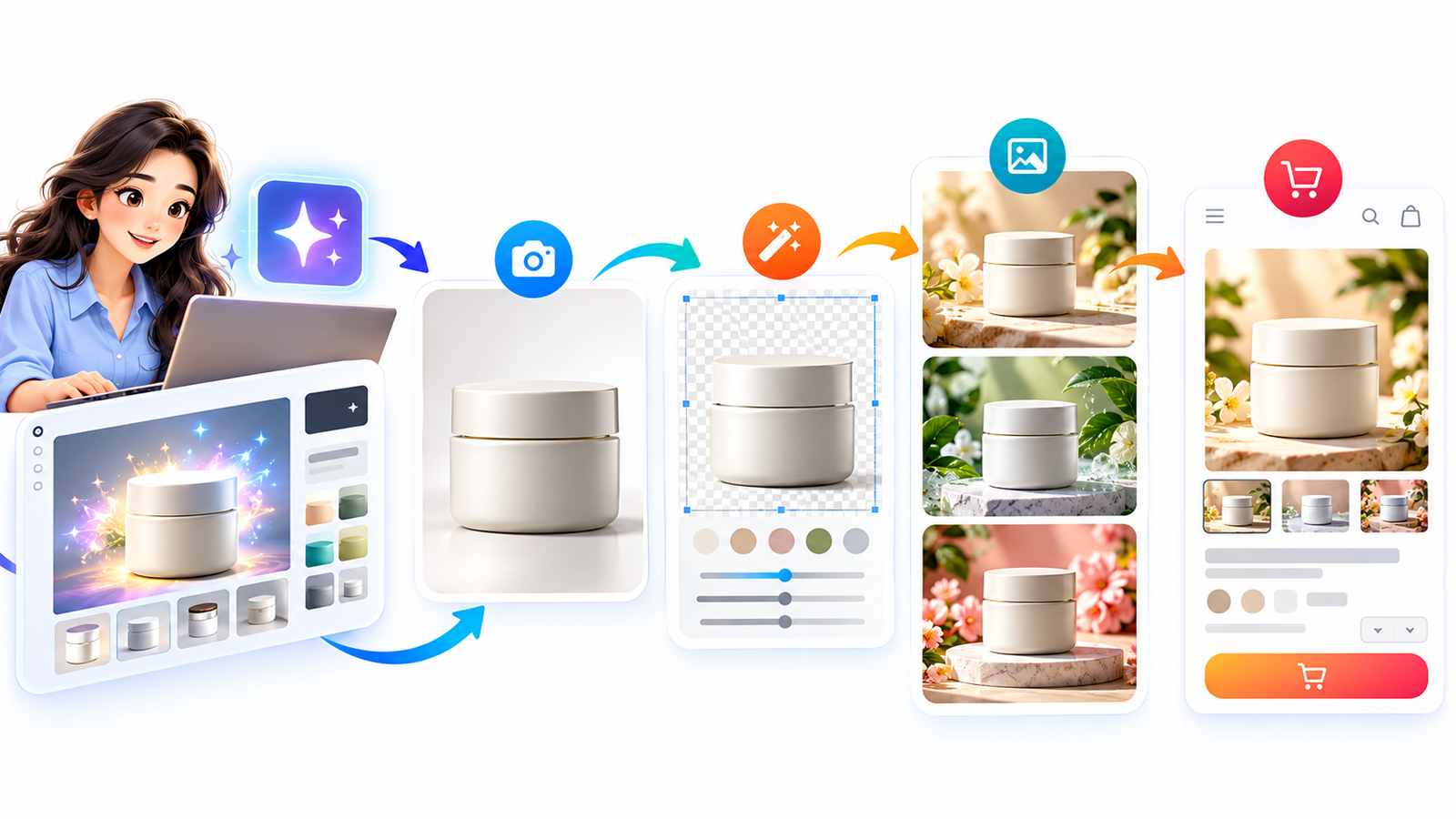
AI Product Photography | E-Commerce Design | Visual Automation | Digital Marketing | 2026 Guide
Turn a single product image into a complete collection of professional e-commerce mockups using AI, smart editing, automated workflows, and conversion-focused visual design.
Original article illustration
AI-assisted product visualization, image refinement, lifestyle scenes, and e-commerce presentation. Created for this article rather than copied from a third-party image library.
Imagine launching a new product and having a complete collection of professional-looking images ready for your online store without organizing a traditional photo shoot for every background, platform, and promotion.
You could create a clean studio image, place the product in a beautiful lifestyle setting, generate seasonal promotional visuals, prepare social media graphics, and produce consistent product listings—all from one carefully controlled visual workflow.
This is the opportunity behind an AI visual generation pipeline.
For online sellers, digital product creators, small businesses, and marketing agencies, artificial intelligence is changing how product photography and e-commerce mockups are produced. But the real advantage isn’t simply generating attractive images. It is building a dependable system that maintains product accuracy, brand consistency, visual quality, and customer trust.
A beautiful AI-generated image may capture attention. A reliable product visualization system helps shoppers understand what they are buying.
The following guide explains how to connect AI image generation, product photography automation, mockup creation, image optimization, and e-commerce publishing into one practical process.
What Is an AI Visual Generation Pipeline?
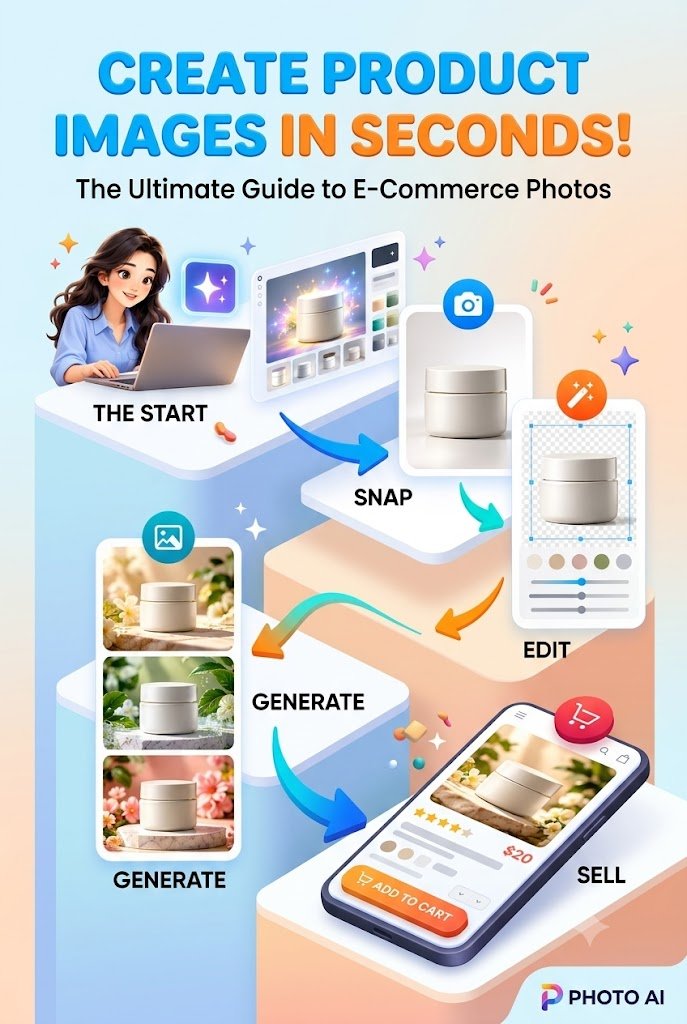
An AI visual generation pipeline is a structured process that uses artificial intelligence and creative automation to transform product information, reference photographs, or design assets into consistent, ready-to-publish marketing visuals.
Instead of designing every product image independently, businesses create repeatable production stages.
Product Assets
AI Generation
Image Editing
Mockup Creation
Quality Checks
Online Store
A repeatable workflow connects creative production with commerce-ready delivery.
A typical pipeline begins with a product reference and ends with optimized visuals published across sales channels.
The goal is to reduce repetitive work while preserving an accurate representation of the product.
This distinction matters. AI should make product presentation more efficient, not invent product features, packaging details, or results that customers will never receive.
Why E-Commerce Businesses Need an Automated Visual Workflow
Online shoppers cannot physically examine a product before purchasing. They rely on images to understand its shape, size, appearance, intended use, and overall quality.
Strong product visuals reduce uncertainty.
For a growing online store, however, producing those visuals can become expensive and time-consuming. Every new product may require several photographs, background treatments, promotional formats, and marketplace-specific exports.
Consider a small skincare brand launching five products. Each product needs a studio image, three lifestyle images, a close-up, and two social media graphics.
That means 35 individual visual assets.
Without a defined process, these assets may end up with inconsistent lighting, different color tones, incorrect package proportions, or mismatched branding.
An automated workflow helps centralize these decisions.
The practical benefits
- Faster creative production: Reuse approved templates, scene instructions, and editing settings.
- Lower repetitive production costs: Reduce unnecessary manual background replacement, resizing, and reformatting.
- Consistent branding: Maintain recognizable lighting, color palettes, typography, and visual composition.
- Faster product launches: Prepare approved marketing assets before inventory arrives.
- Better testing opportunities: Compare different lifestyle scenes and promotional layouts without rebuilding the entire campaign.
- Scalability: Expand from a handful of products to a larger catalog with documented production standards.
Not every task should be automated. Physical dimensions, ingredient labels, packaging accuracy, and potentially misleading visual claims require careful human review.
The strongest system combines AI efficiency with human judgment.
Step 1: Build a Reliable Product Asset Library
Start with accurate product information
A successful pipeline begins long before the first AI prompt.
The original product must be clearly documented. If the source material is inaccurate, automation simply reproduces those mistakes across dozens of images.
Start by collecting a reliable visual reference for every product.
For physical products, the asset library should contain high-quality photographs, actual dimensions, color specifications, packaging artwork, material information, and verified product descriptions.
For digital products, it might contain e-book covers, printable PDF previews, software screenshots, workbook pages, or editable template designs.
Organize every product with a unique identifier
A simple folder structure can prevent considerable confusion.
Product_SKU_001/
  01_Original_Assets/
  02_AI_Generated_Scenes/
  03_Approved_Mockups/
  04_Web_Optimized/
  05_Social_Media/
  06_Quality_Reports/
Keep the unmodified product source separate from AI-generated output.
It is also worth creating a small product specification sheet containing:
| Field | Example |
|---|---|
| Product ID | SKIN-001 |
| Product name | Daily Hydration Cream |
| Product dimensions | Verified from manufacturer |
| Primary color | Warm ivory |
| Label artwork | Approved master label |
| Primary background | Neutral white |
| Brand mood | Clean, botanical, premium |
| Required visuals | Studio, lifestyle, detail, banner |
| Approval status | Pending / Approved |
This structured information can later feed directly into reusable AI prompts and automated image processing.
Practical tip: Use a locked product reference image whenever possible. Let AI generate the environment around the product rather than redesigning the actual product.
Step 2: Choose the Right AI Visual Generation Tools
Match the technology to the task
There is no single tool that handles every stage of professional e-commerce image production perfectly.
Different tools specialize in image generation, visual editing, background removal, mockup assembly, and workflow automation.
| Tool category | Example tools | Suitable use |
|---|---|---|
| AI image generation | ChatGPT Images, Adobe Firefly, Midjourney | Backgrounds, creative concepts, lifestyle scenes |
| Product image editing | Photoshop, PhotoRoom | Retouching, background replacement, compositing |
| Mockup design | Canva, Placeit, Smartmockups | Product presentations and digital-product previews |
| Automated image delivery | Cloudinary, image-processing services | Resizing, transformations, asset management |
| Workflow orchestration | Make, Zapier, n8n | Connecting approved files, processes, and publishing systems |
| E-commerce publishing | Shopify, WooCommerce | Product listings and storefront media |
These are examples rather than a required software stack. Features, APIs, commercial-use rights, and subscription limits vary.
For a small seller, an AI image tool, a reliable editor, and a mockup template may be enough.
For a business managing hundreds of products, an automated asset-management and approval system can be more valuable than adding another image generator.
Build a practical starter stack
A beginner-friendly workflow might involve:
- Photographing or exporting the original product.
- Creating lifestyle backgrounds with an AI generator.
- Compositing the real product into those backgrounds.
- Preparing layouts in Canva or Photoshop.
- Exporting approved visuals for Shopify or another store.
Once that works consistently, connect the stages with automation.
The key is to automate a process that already produces accurate results. Automating a broken process only creates more mistakes, faster.
Step 3: Create a Reusable AI Product Photography Prompt System
Turn individual prompts into a creative system
One of the biggest challenges in AI product photography is visual inconsistency.
You might generate an elegant product image today, then struggle to recreate the same lighting and background treatment tomorrow.
A reusable prompt framework solves part of this problem by separating fixed brand requirements from the creative elements that can change.
An effective framework includes the product reference, setting, composition, lighting, mood, output format, and strict accuracy requirements.
Example: premium skincare product prompt
Create a photorealistic e-commerce lifestyle composition featuring the supplied reference image of a premium skincare jar.
Product accuracy: Preserve the original jar shape, cap design, proportions, packaging colors, and approved label artwork. Do not invent new product details, branding, ingredients, or claims.
Environment: A minimalist skincare studio with soft beige stone, subtle botanical elements, and a clean, uncluttered background.
Lighting: Soft natural daylight from the left, realistic contact shadows, gentle reflections, and balanced highlights.
Composition: Product centered with sufficient negative space for a headline or promotional message.
Visual style: Premium commercial product photography, natural textures, realistic perspective, restrained color grading, and professional advertising quality.
Output: High-resolution landscape composition, suitable for a 16:9 website promotional banner.
Restrictions: No invented text, duplicate products, distorted packaging, unrealistic reflections, watermarks, or misleading product features.
If exact preservation of the product is not possible, generate only the background scene for later compositing with the original product photograph.
This type of prompt creates a reproducible starting point.
However, prompting alone cannot guarantee that AI will preserve a product perfectly.
If a label must remain identical, compositing the original approved label or product photograph is generally safer than relying on generated lettering.
Introduce controlled prompt variables
Create a master prompt with editable fields such as:
- Product reference and SKU
- Background environment
- Lighting direction
- Camera perspective
- Brand color palette
- Platform and aspect ratio
- Campaign theme
For example, a single skincare jar could be presented in a modern bathroom, on a botanical display, or against a clean studio background while keeping the product image unchanged.
That is how prompt engineering becomes a production workflow rather than a collection of unrelated experiments.
Step 4: Generate Studio, Lifestyle, and Promotional Images
A complete product listing should answer different shopper questions, not merely display six variations of the same attractive photograph.
Consider developing three visual categories.
Studio photography
Clear, accurate photographs showing the product without distractions. These work especially well as primary product images.
Lifestyle photography
Product presentations in believable environments that help buyers imagine ownership and use.
Promotional photography
Campaign visuals designed with room for offers, headlines, seasonal messages, and calls to action.
The importance of visual hierarchy
Product photography should direct attention toward the item being sold.
A common mistake is allowing elaborate AI-generated backgrounds to overpower the product itself.
If a shopper notices the decorative flowers, luxury room, or dramatic lighting before recognizing the product, the image may not be serving its commercial purpose.
For most product listings, prioritize:
- Product visibility
- Accurate color and appearance
- Realistic perspective
- Natural lighting
- Supporting context
- Clear visual composition
For example, a handmade ceramic mug may look appealing on a beautifully decorated kitchen table. But buyers also need an unobstructed photograph showing the handle, glaze, rim, and actual shape.
Creative backgrounds can support the sale. They should not replace the evidence shoppers need.
Step 5: Convert AI Visuals Into Professional E-Commerce Mockups
Build mockups that show the real product clearly
An e-commerce mockup is a visual representation of how a product appears in a particular context.
Mockups are especially useful for digital products, packaging designs, print-on-demand merchandise, promotional campaigns, and pre-launch presentations.
The process generally consists of four layers.
Background sceneAI-generated or properly licensed environment
Product assetReal photograph, original design, or approved digital file
Lighting and realismPerspective, contact shadows, reflections, and matching color
Approved commercial mockupExported with accurate details and platform-ready dimensions
Example: creating e-book mockups
Suppose you sell a digital guide titled The Smart Creator’s Productivity Workbook.
You already have a finished PDF and an approved cover design.
Instead of generating fictional book covers with AI, you can place the actual cover into a professionally designed mockup scene.
Possible presentation formats include:
- A tablet displaying the real PDF cover.
- A smartphone showing an actual page of the workbook.
- A desktop scene with the digital product preview.
- A promotional bundle graphic showing the included downloadable files.
- A clean three-dimensional book-style render, clearly presented as a digital mockup rather than evidence of a physical product.
These presentations help prospective buyers understand what they will receive.
A good digital-product mockup should communicate both the product’s contents and its delivery format.
Step 6: Automate Background Removal, Editing, and Image Resizing
Manual visual editing can consume more time than image generation itself.
Background removal, object placement, color correction, file naming, and aspect-ratio adjustments are all candidates for partial automation.
A streamlined editing workflow may include:
Background isolation: Remove unwanted backgrounds while preserving natural edges, fine details, and transparent materials.
Color consistency: Apply approved color adjustments to backgrounds and lighting without changing the actual product color.
Shadow matching: Add realistic contact shadows so the product appears grounded in the generated setting.
Perspective alignment: Ensure the camera angle of the product matches the environment.
Format conversion: Create optimized files for websites, marketplaces, email campaigns, and social media.
Recommended export planning
| Placement | Working dimensions | Format |
|---|---|---|
| Square product gallery | 2048 × 2048 px | JPEG, PNG or WebP |
| Landscape promotional banner | 1920 × 1080 px | JPEG or WebP |
| Instagram square post | 1080 × 1080 px | JPEG or PNG |
| Instagram portrait post | 1080 × 1350 px | JPEG or PNG |
| Pinterest graphic | 1000 × 1500 px | JPEG or PNG |
| Blog featured image | 1280 × 720 px | JPEG or WebP |
These are practical production targets, not universal platform requirements. Confirm each destination’s latest specifications, safe areas, supported formats, and compression behavior.
For example, Shopify currently supports product images up to 5000 × 5000 pixels or 25 megapixels, with a file size below 20 MB, and recommends 2048 × 2048 pixels for square product images.

Product media types
Automate naming conventions
Use clear, consistent image filenames.
skincare-cream-main-studio.webp
skincare-cream-lifestyle-bathroom.webp
skincare-cream-label-detail.webp
skincare-cream-social-banner.webp
Descriptive filenames improve organization and make future catalog maintenance easier.
Use equally meaningful image alt text, describing what the visual actually contains rather than stuffing keywords into every field.
Step 7: Connect the Pipeline to Your Online Store
Move from approved assets to product listings
This is where a creative workflow becomes an operational e-commerce system.
An effective automated pipeline should recognize when approved assets are ready, match those assets to the correct product, and prepare them for publishing.
A typical integration might work as follows:
- New product created. A product ID and original reference photograph are added to the catalog.
- Automation starts. The workflow retrieves the approved asset information and launches background or mockup generation.
- Images enter review. Generated assets are checked for product accuracy, image quality, licensing, and technical compliance.
- Approved files are optimized. The system creates appropriate image formats and dimensions.
- Product media are matched. Each image is assigned to the appropriate product and variant.
- Draft listings are prepared. The e-commerce platform receives the approved assets, descriptions, and other verified information.
- Final publication is authorized. The store owner confirms the presentation before the listing goes live.
Why a human approval gate matters
Fully automatic publishing sounds attractive. But one inaccurate product image can create support requests, refunds, disappointed customers, and loss of trust.
A more reliable model uses automation for predictable tasks and human approval for high-impact decisions.
For example, the system can automatically create ten background variations, but only the approved three should reach the public product gallery.
This reduces the chance that a visual generation error becomes a customer-facing problem.
Step 8: Use Product Photography Automation to Improve Conversions
The value of e-commerce mockups should be measured by their ability to help shoppers make informed decisions, not simply by how visually impressive they look.
Match every image to a buyer question
Consider the customer journey.
A potential buyer may initially wonder, “What is this product?”
After seeing a studio image, their next question may be, “How would I use it?”
A lifestyle image helps answer that question.
They may then ask, “How large is it?” or “What does the packaging actually look like?”
A scale reference, dimension graphic, or authentic detail photograph provides the missing information.
Finally, they may want reassurance about what the package includes.
A clear contents image or accurate digital-product preview can help.
The strongest product gallery acts like a visual sales conversation.
Build a conversion-focused image sequence
| Image position | Purpose | Recommended visual |
|---|---|---|
| 1 | Establish product identity | Clear studio photograph |
| 2 | Show real-world context | Lifestyle image |
| 3 | Communicate dimensions | Verified scale graphic |
| 4 | Demonstrate detail | Close-up or actual screenshot |
| 5 | Explain use | Accurate application or usage visual |
| 6 | Clarify what’s included | Package contents or digital bundle preview |
| 7 | Reinforce appeal | Promotional mockup |
Not every product needs seven images. The objective is to remove uncertainty, not overwhelm the shopper.
Test visual performance with real data
For a controlled test, compare an existing product presentation with a new, accurate AI-assisted visual treatment.
Measure product page engagement, add-to-cart rate, conversion rate, return rate, and relevant customer feedback.
Change one meaningful visual element at a time where possible. Otherwise, it becomes difficult to identify what influenced results.
A higher click-through rate is not necessarily a success if the new image attracts the wrong expectations and increases returns.
Step 9: Create a Scalable Workflow for Multiple Products
The challenges change when a business moves from managing five products to 500.
At that stage, consistent processes become more important than individual design skills.
Create a reusable visual production system with product-specific variables, brand-wide style rules, approved prompt templates, standardized file formats, and centralized quality control.
Example: a 100-product catalog
Suppose each product needs five approved images.
That creates a requirement for 500 finished assets.
A business producing each image independently must repeatedly manage design choices, editing steps, exports, and file organization.
A structured system can reuse approved scene templates and processing rules across product categories.
For planning purposes, consider these illustrative assumptions:
| Metric | Manual process | Assisted process |
|---|---|---|
| Products | 100 | 100 |
| Approved images per product | 5 | 5 |
| Average working time per image | 15 minutes | 6 minutes |
| Total estimated working time | 125 hours | 50 hours |
Under these assumptions, the assisted workflow saves approximately 75 working hours. This is a hypothetical planning model, not a documented industry benchmark or guaranteed result.
Actual savings depend on the complexity of the products, required retouching, generation failures, approval rates, and team experience.
A more detailed cost model should include generation fees, software subscriptions, quality assurance, storage, and rejected outputs.
Track rejected images
One useful performance metric is the first-pass approval rate.
If a system produces 100 images and only 60 meet the quality requirements, the remaining 40 create extra work.
Improving that approval rate may be more profitable than generating additional images at a lower price.
Step 10: Build a Reusable Brand Visual Identity
Make every product look like it belongs to the same brand
One disadvantage of uncontrolled AI generation is that every image can have a different artistic personality.
A product might appear luxurious in one image, playful in the next, and aggressively futuristic in another.
That inconsistency can weaken brand recognition.
Develop a short visual identity guide covering your preferred backgrounds, lighting, color palette, camera angles, composition rules, and typography.
For example, a premium home decor brand might use natural sunlight, warm neutral backgrounds, realistic interior scenes, restrained props, and soft architectural shadows.
A technology accessories brand might prefer structured compositions, cool lighting, precise reflections, and clean geometric environments.
Once approved, these instructions become part of every generation request.
The result is not identical imagery. It is recognizable visual consistency across different products and campaigns.
Step 11: Make the Pipeline Search-Friendly and AI-Discoverable
AI-generated product visuals can contribute to a stronger website experience when supported by descriptive content, accurate metadata, accessible images, and useful product information.
For organic visibility, focus on creating visuals that match the surrounding page.
A blog article about e-commerce mockups should include meaningful product visualization examples, not decorative images unrelated to the subject.
Improve product and blog image discoverability
Use descriptive filenames, readable alt text, appropriate image dimensions, and fast-loading responsive images.
Implement relevant Product structured data on eligible product pages and Article or BlogPosting structured data on editorial content.
For Google Discover, Google recommends high-quality representative images at least 1200 pixels wide and support for large image previews. However, meeting these requirements does not guarantee inclusion or rankings.
Google for Developers
Search optimization should also account for AI-assisted discovery.
Clear definitions, step-by-step instructions, transparent limitations, meaningful examples, and directly answered questions make articles easier for readers and retrieval systems to interpret.
Rather than repeatedly publishing generic claims about revolutionary AI technology, demonstrate a real workflow and explain the decisions that make it successful.
That is a more useful foundation for lasting search visibility.
Step 12: Turn Your Visual Pipeline Into a Revenue-Generating Service
Offer repeatable creative solutions to businesses
An effective AI visual generation pipeline can become more than an internal production system.
Freelancers, designers, marketers, and small agencies may package these capabilities into services for online sellers.
Possible service packages include product image background editing, digital product mockup design, seasonal promotional image bundles, catalog image optimization, and visual asset preparation for Shopify or WooCommerce.
Example service packages
| Package | Illustrative deliverables | Illustrative price |
|---|---|---|
| Starter | 5 edited product visuals | $29–$79 |
| Growth | 15 product mockups and promotional assets | $99–$249 |
| Brand Collection | 40 approved visual assets | $299–$699 |
| Catalog Workflow Setup | Customized production templates and automation configuration | Quoted per project |
These are hypothetical service-positioning examples, not verified market averages. Pricing should account for revisions, software expenses, project complexity, commercial rights, and client approval requirements.
Sell a business outcome, not just an AI image
Business owners rarely need another image-generation tool for its own sake.
They need better product presentation, fewer repetitive tasks, reliable brand consistency, and faster campaign preparation.
A service offer could communicate that value with a message such as:
Turn your existing product photographs into a consistent, commerce-ready visual collection without rebuilding every image from scratch.
Support that promise with real examples and transparent deliverables. Avoid making unsubstantiated claims about conversion improvements or production time savings.
A Practical Seven-Day Implementation Plan
A working pipeline does not have to begin with a large automation project.
Start with one product category, measure the results, and improve the process before expanding.
Your first-week implementation checklist
Implementation progress
0 of 7 completed
Day 1: Collect verified product photographs and design files
Day 2: Select the image-generation and editing tools
Day 3: Create three reusable scene prompts
Day 4: Produce studio, lifestyle, and promotional mockups
Day 5: Test product accuracy and technical image quality
Day 6: Publish an approved product gallery
Day 7: Review time, costs, feedback, and conversion data
Copy implementation plan
This gradual approach creates a useful foundation for future expansion.
By the end of the first week, the objective is not to build a completely autonomous image factory. It is to establish a reliable process that produces accurate, reusable visual assets.
Five Frequently Asked Questions
1. Can AI-generated images replace professional product photography?
AI-generated images can replace or simplify certain creative production tasks, especially background design, lifestyle scene creation, and promotional concept development.
However, real product photographs remain important when buyers need to verify exact colors, physical details, dimensions, packaging, and materials.
A hybrid workflow combining authentic product photography with AI-assisted editing is often the most practical solution.
2. What is the best AI tool for creating e-commerce mockups?
The best choice depends on the type of product and level of automation required.
For digital-product presentations, established mockup templates and design tools may be sufficient. For lifestyle product photography, AI image generation combined with professional compositing offers more flexibility.
For larger catalogs, consistent asset management and quality control may matter more than the particular image generator.
3. How much does an AI product photography pipeline cost?
The cost depends on software subscriptions, generated image volume, storage, editing complexity, automation services, and human review.
A small business may begin with a few affordable tools and manual approval.
A larger operation may need API-based workflows, centralized asset storage, and more advanced image processing.
Compare the total cost per approved, usable image rather than simply the cost per generated image.
4. Can AI-generated product images be used legally for commercial purposes?
They often can, but commercial-use permissions depend on the relevant tool’s terms, the source assets, trademarks, licensing restrictions, and applicable law.
AI output does not automatically guarantee copyright protection, originality, or freedom from intellectual property claims.
Businesses should review commercial licensing terms, retain relevant records, obtain permissions where needed, and comply with marketplace requirements.
5. How can AI-generated mockups improve online sales?
Well-designed mockups can help customers visualize a product in context, understand its features, and feel more confident about a purchase.
The most useful images reduce uncertainty while accurately representing what the customer will receive.
However, conversion improvements are not guaranteed. Test approved image variations against meaningful business metrics and consider customer feedback alongside sales performance.
Compliance Note: Copyright, AI Transparency, Advertising, and Customer Trust
Responsible product image creation is essential for long-term business credibility.
Copyright and image licensing: Use original photographs, authorized brand assets, or images and templates with verified commercial-use permissions. A royalty-free image is not necessarily free from all restrictions. Check licenses, attribution rules, model releases, property releases, and redistribution rights where applicable.
AI image identification: Google Merchant Center requires metadata identifying images created with generative AI, including the applicable IPTC DigitalSourceType information. Preserve required metadata through editing, export, and catalog publishing workflows. Google also specifies structured attributes for AI-generated product titles and descriptions.
Google Merchant Center Help
+1
Truthful product representation: Do not change product features, exaggerate results, invent accessories, misrepresent quantities, or create misleading before-and-after comparisons. AI-generated environments should not imply product capabilities that have not been verified.
Advertising compliance: Follow consumer protection and advertising rules applicable to the countries where products are marketed. Disclose synthetic imagery when needed to prevent a misleading impression, particularly in sensitive or evidence-dependent product categories.
Privacy and permissions: Obtain appropriate permission before uploading confidential product designs, client assets, identifiable customer photographs, or other protected information to third-party AI services.
Image accessibility: Provide meaningful alt text and ensure that important information is also available as readable page text. Images should enhance the shopping experience rather than serve as the only source of product information.
Editorial and SEO integrity: Review AI-assisted content for factual accuracy, originality, relevance, and transparent sourcing. Avoid fabricated testimonials, invented performance statistics, or unsupported claims about search rankings and sales outcomes.
Commercial-use reminder: The original illustration accompanying this article was generated specifically for this response. Before republishing any AI-created visual in advertising or on commercial marketplaces, check applicable service terms, image metadata, and platform policies.
Build a Visual Production System That Customers Can Trust
The future of AI-powered e-commerce design is not about generating the greatest number of images.
It is about creating the right images through a repeatable process that makes products easier to understand, improves operational efficiency, and maintains buyer confidence.
A thoughtful AI visual generation pipeline connects accurate product assets, creative image generation, professional editing, realistic mockup composition, automated delivery, and human quality control.
Start with one product. Create a small collection of approved visuals. Document the steps that consistently work. Then expand those steps into a larger product photography automation system.
For store owners, this can mean a more consistent catalog and less repetitive design work. For freelancers and agencies, it can become a structured service with clear deliverables. For digital product creators, it offers a practical way to present e-books, templates, and downloadable resources professionally.
Your next step: Select one product from your store and build its first complete visual collection—one authentic studio image, two lifestyle mockups, one detail image, and one promotional graphic. Use the results to create a reusable template for your next launch.
A successful visual pipeline should not only make products look attractive. It should make the business behind those products more efficient, reliable, and easier to scale.
Stay ahead with exclusive updates
Join our community. Get curated industry trends, actionable guides, and fresh resources delivered straight to your inbox.