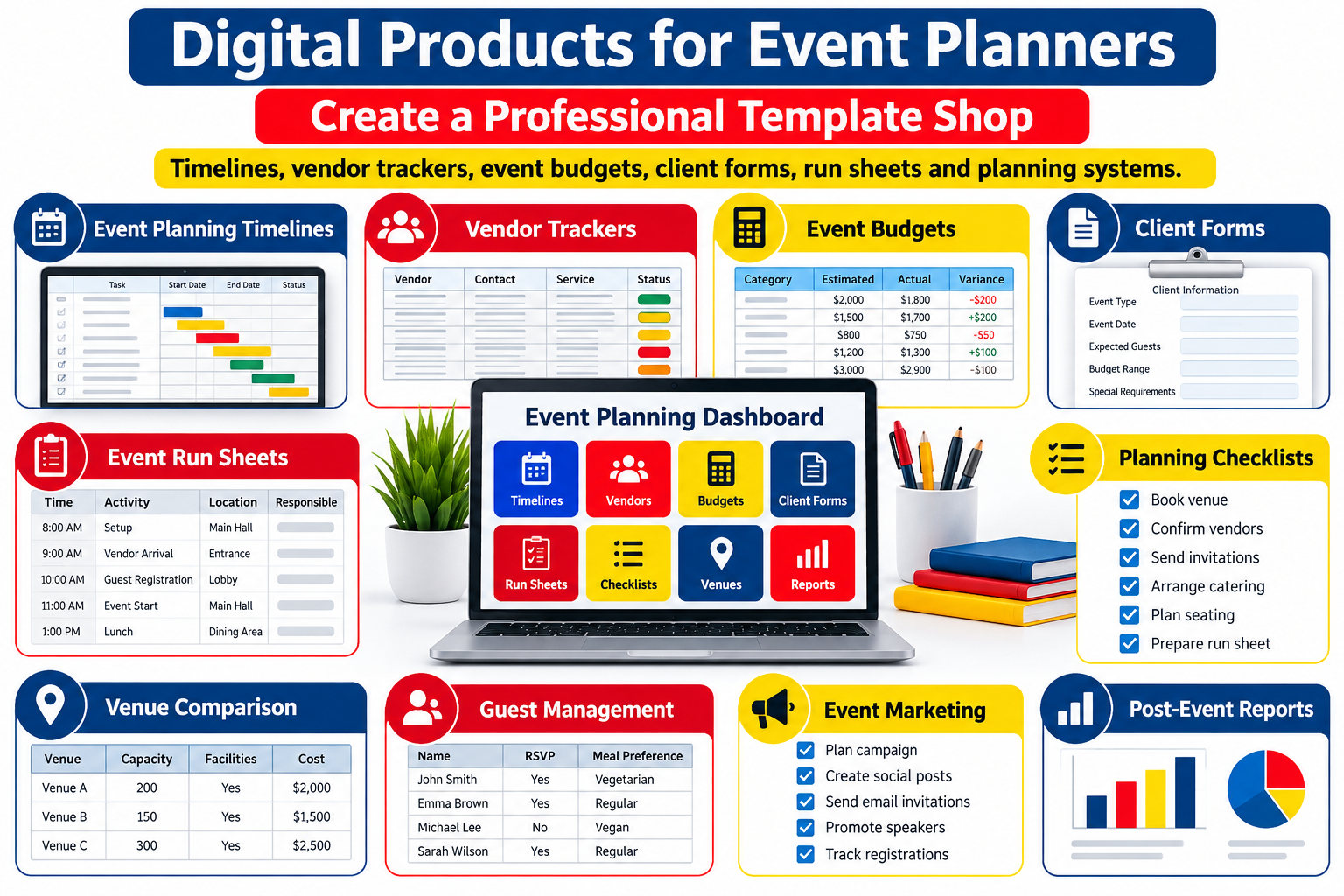
Event planners do not simply organize parties, conferences, weddings, or corporate meetings. They manage hundreds of moving details while coordinating clients, vendors, venues, budgets, deadlines, staff, schedules, guest expectations, and last-minute changes.
That complexity creates an excellent opportunity for digital product creators.
A well-designed collection of event planner templates can turn complicated planning processes into repeatable systems. Instead of creating another decorative printable that customers use once, you can build practical event planning digital products that help professionals organize real projects, reduce administrative work, communicate more clearly, and keep events running on schedule.
Products such as event timelines, vendor trackers, event budget spreadsheets, client questionnaires, event run sheets, venue comparison tools, checklists, planning dashboards, and complete event-planning systems can be sold individually or combined into premium bundles.
The opportunity is especially relevant in 2026. Event planners are dealing with rising costs, tighter budgets, expanding technology choices, and increased pressure to demonstrate measurable event value. Current Cvent research describes a move toward engagement, efficiency, better technology use, and more intentional planning.
That means the strongest digital products for event planners are not simply attractive.
They solve operational problems.
Why Event Planning Templates Can Become Valuable Digital Products
Professional events contain repeatable processes.
A wedding planner may manage different couples every month, but the underlying workflow often includes similar stages: inquiry, consultation, proposal, contract, budgeting, venue coordination, vendor management, timeline preparation, final confirmation, event-day execution, and post-event follow-up.
Corporate planners have different requirements, but they also repeat workflows involving budgets, speakers, sponsors, venues, attendees, suppliers, schedules, production teams, approvals, and reporting.
This repetition is what makes event planning downloads valuable.
Instead of rebuilding a spreadsheet, questionnaire, timeline, or checklist for every event, planners can start with a professionally structured system and customize it.
The product is therefore not merely a PDF or spreadsheet.
It is saved time, reduced confusion, and a better planning workflow.
The Best Event Planner Templates Solve Specific Problems
A successful template shop should begin with problems rather than designs.
Ask what repeatedly slows an event planner down.
Perhaps vendors provide information through different email threads.
Perhaps budget changes are difficult to monitor.
Perhaps clients forget decisions they approved three weeks earlier.
Perhaps event-day staff do not know when particular tasks must happen.
Perhaps planners spend too much time rebuilding documents for every new client.
Each problem can become a digital product.
The stronger your connection between a problem and its solution, the easier the product is to explain and market.
A generic document called “Event Planner Worksheet” says very little.
A product called Wedding Vendor Contact and Payment Tracker immediately explains what it helps the buyer accomplish.
Specificity strengthens both conversion and search visibility.
1. Event Planning Timeline Templates
Timelines are among the most practical digital products for event planners because almost every event contains deadlines.
A professional event timeline can begin months before the event and continue through teardown.
Your template might cover client onboarding, venue booking, vendor confirmation, marketing deadlines, speaker preparation, catering decisions, payment deadlines, equipment delivery, rehearsals, setup, event execution, and post-event activities.
Different timeline products can target different event types.
A wedding planning timeline might begin 12 months before the ceremony.
A corporate conference timeline could focus on speakers, sponsors, registrations, production, marketing, and venue logistics.
A small workshop timeline may cover only six or eight weeks.
This creates an opportunity to sell both individual products and specialized collections.
Make Timelines Easier to Customize
Consider offering editable versions in Google Sheets, Excel, Notion, Canva, or another widely used format depending on the product.
Add columns for task, owner, deadline, status, priority, dependencies, notes, and completion.
A timeline becomes far more valuable when the customer can turn it into their own operating system.
2. Vendor Management Trackers
Vendor coordination is one of the most detailed parts of event planning.
Florists, photographers, caterers, decorators, entertainment providers, audiovisual teams, venues, rental companies, security services, transportation providers, printers, production crews, and other suppliers may all need to be managed simultaneously.
A vendor tracker template can centralize important information such as company name, contact person, phone number, email address, service category, contract status, deposit, remaining balance, payment deadline, arrival time, insurance requirements, deliverables, and notes.
You can expand the product with dedicated sections for contracts, payment schedules, documents received, outstanding questions, and event-day contact details.
For planners managing multiple suppliers, the value is immediate: fewer scattered messages and one central location for important information.
3. Event Budget Templates
Budget management is one of the strongest commercial categories for an event planning template shop.
Costs can change quickly.
An initial estimate might be very different from the final amount once venue charges, taxes, service fees, equipment, staffing, transportation, décor, marketing, entertainment, catering, and contingency expenses are included.
A useful event budget spreadsheet should help buyers distinguish between projected costs and actual costs.
It can include categories for estimated budget, quoted cost, deposit paid, remaining balance, payment due date, actual expense, variance, and notes.
Cvent’s 2026 industry coverage highlights cost pressure and the need for planners to make smarter decisions while protecting event quality, which reinforces the practical value of stronger budgeting systems.
You can create specialized versions for weddings, conferences, corporate meetings, nonprofit events, festivals, birthday celebrations, workshops, retreats, and product launches.
4. Client Intake Forms
Client onboarding can become another complete digital product category.
Before planning begins, event professionals need information.
What kind of event is being planned?
How many guests are expected?
What is the client’s budget?
What dates are available?
What atmosphere does the client want?
Are venues already being considered?
Which decisions are priorities?
What services does the client expect the planner to handle?
A professional event planner client questionnaire helps gather this information before meetings become unnecessarily long.
Products might include inquiry forms, consultation questionnaires, event vision worksheets, client preference forms, approval forms, change request forms, and post-event feedback questionnaires.
These resources can be especially attractive to newer event planners who are still developing their business processes.
5. Event-Day Run Sheets
A beautifully planned event can still become chaotic without clear execution.
That is why the event run sheet template can be one of the most valuable operational products in your shop.
A run sheet records what happens, when it happens, where it happens, and who is responsible.
For example, it may include supplier arrival, equipment setup, staff briefing, registration opening, guest arrival, entertainment cues, speeches, catering service, photography moments, stage changes, transportation movements, breakdown, and final venue checks.
Columns might include:
Time, activity, location, responsible person, supplier, contact information, equipment required, status, and contingency notes.
This type of product can serve weddings, conferences, ceremonies, award nights, festivals, launches, workshops, retreats, and private celebrations.
6. Master Event Planning Checklists
People search for checklists because they want confidence that nothing important will be forgotten.
A master event planning checklist can cover the full planning journey.
Instead of creating a single enormous checklist, consider organizing the resource into phases such as discovery, budgeting, venue sourcing, supplier booking, guest management, marketing, production planning, final confirmation, event day, and post-event review.
This makes the template easier to use.
It can also lead naturally to related products.
Someone who purchases a planning checklist may later need your vendor tracker, budget spreadsheet, venue comparison sheet, timeline, or complete event management bundle.
7. Venue Comparison Templates
Choosing a venue often involves much more than comparing rental prices.
Planners may need to evaluate capacity, location, parking, accessibility, catering restrictions, available dates, equipment, accommodation, insurance, setup time, Wi-Fi, audiovisual capabilities, décor restrictions, transportation, staff availability, cancellation terms, and total cost.
A venue comparison spreadsheet lets customers compare these factors side by side.
Cvent’s 2026 sourcing research, based on responses from more than 1,650 planners, highlights how technology increasingly supports venue evaluation and sourcing.
That creates room for digital products focused specifically on venue research and decision-making.
8. Event Contact Directory
An event contact sheet sounds simple, but during an event it can become one of the most frequently used documents.
Instead of searching through email conversations, staff can access one organized directory containing key contacts.
Include the event manager, client, venue manager, caterer, photographer, entertainment provider, transportation provider, production lead, emergency contact, security team, rental provider, and other essential suppliers.
Create printable and mobile-friendly versions.
The goal is rapid access during time-sensitive situations.
9. Event Production Checklists
Larger events involve production details that ordinary planning checklists may not cover.
An event production checklist can include microphones, speakers, projectors, presentation files, stage lighting, backup cables, signage, screens, internet connections, staging, power supply, technical rehearsals, recording equipment, livestream equipment, and emergency backups.
For corporate events, conferences, launches, and educational programs, this could become an important specialized product.
Niche products can often appear more valuable because they solve a narrower problem more completely.
10. Guest Management Templates
Guest organization creates another product family.
You might offer guest lists, RSVP trackers, dietary requirement sheets, seating charts, accommodation trackers, transportation lists, invitation trackers, VIP management sheets, badge lists, and attendance dashboards.
These can be adapted for weddings, conferences, private parties, fundraising events, networking events, and retreats.
A more advanced version could automatically calculate total attendance, confirmed guests, cancellations, meal selections, and outstanding responses.
11. Speaker and Presenter Trackers
Conference and corporate event planners frequently manage multiple speakers.
A speaker management system could track biography received, photograph received, presentation title, session time, technical requirements, travel arrangements, hotel requirements, presentation file status, agreement status, payment status, rehearsal time, and special instructions.
You can combine it with a speaker onboarding questionnaire and presentation submission form to create a more valuable bundle.
12. Sponsorship Management Templates
Events involving sponsors often require substantial administration.
Create a sponsorship tracker that records company information, sponsorship package, payment status, logo files, booth requirements, advertising deliverables, complimentary tickets, social media mentions, signage placement, representative details, deadlines, and fulfillment status.
Combine it with sponsor onboarding forms and deliverables checklists.
This turns a single spreadsheet into a complete sponsorship management kit.
13. Event Marketing Planners
Marketing-focused event templates can reach another audience: event marketers.
Products could help organize email campaigns, social content, early-bird deadlines, partnerships, promotional assets, speaker announcements, sponsor announcements, media outreach, registration campaigns, and post-event content.
A marketing calendar can also include campaign owner, platform, audience, asset status, publication date, CTA, tracking link, and performance notes.
This expands your shop beyond traditional event logistics.
14. Post-Event Evaluation Templates
The planning process does not end when guests leave.
Professional planners increasingly need to evaluate results.
An event review system can include attendance, budget performance, supplier performance, client feedback, attendee feedback, operational problems, successful decisions, engagement, marketing results, lessons learned, and recommendations.
Measurement matters increasingly in professional events. Cvent’s 2026 trend reporting emphasizes the growing importance of first-party event data, measurable outcomes, and demonstrating value.
A post-event reporting template can therefore serve both planners and event marketing teams.
15. Complete Event Planning Systems
Individual templates can bring customers into your shop.
Complete systems can increase order value.
For example, a professional event planning digital product bundle could combine a client intake questionnaire, event brief, master checklist, project timeline, event budget, vendor tracker, venue comparison sheet, guest tracker, run sheet, contact directory, production checklist, payment tracker, and post-event review.
Instead of presenting the bundle as “13 PDFs,” describe the workflow.
The customer should understand how the resources connect from the first client inquiry to the post-event report.
That is the difference between selling files and selling a planning system.
Build Products for Specific Event Niches
Trying to create templates for every planner immediately can make a shop feel generic.
Niche positioning often produces clearer products.
A wedding planner has different requirements from a conference producer.
A children’s party planner works differently from a corporate event manager.
A retreat organizer has different logistics from a festival producer.
You could therefore develop collections around wedding planning, corporate meetings, conferences, workshops, retreats, nonprofit events, networking events, private celebrations, destination events, virtual events, hybrid events, launches, and community gatherings.
Once one niche collection works well, you can adapt the underlying structure for another audience.
Design for Real Working Conditions
An event planning template should look professional, but usability matters more than decoration.
Planners often use documents quickly, sometimes from a phone, backstage, inside a venue, or while speaking with a client.
Keep layouts easy to scan.
Use clear headings.
Leave enough space for customization.
Avoid unnecessary design elements that make spreadsheets difficult to read.
Make important information easy to find.
Provide printing-friendly versions where appropriate.
For spreadsheets, use logical columns and clearly identified input areas.
For client-facing forms, make the experience polished enough that planners would feel comfortable sending the documents directly to customers.
Sell Editable Templates Whenever Practical
Many event planners do not want a rigid document.
They want a starting point.
Editable products can therefore offer greater perceived utility.
Depending on the product, formats might include Excel, Google Sheets, Canva, editable PDF, Word, Google Docs, or Notion.
You do not need to provide every format.
Choose formats that make sense for the specific workflow.
A budget is naturally suited to spreadsheet software.
A client questionnaire may work well as a document or form.
A visual event proposal might suit Canva.
A large event management dashboard could work in Notion or Sheets.
Format should follow function.
Create a Product Ladder Instead of a Random Catalog
A strong template shop can guide buyers from smaller products toward larger systems.
Your entry-level offer might be a simple event budget template.
A mid-level offer could combine budget, vendor, venue, and payment trackers.
A premium offer could include the entire client-to-event-day workflow.
You can also develop specialized bundles such as Wedding Planner Business Kit, Corporate Event Operations Kit, Conference Planning Dashboard, Event Vendor Management System, Event Day Coordination Pack, or Event Budget and Finance Toolkit.
This gives shoppers different levels of commitment while making your store easier to navigate.
Make Your Product Listings Sell the Outcome
Avoid relying only on statements such as “beautiful design” or “easy to use.”
Explain what the customer can accomplish.
Instead of:
“Includes an editable vendor spreadsheet.”
Try:
“Keep vendor contacts, contracts, deposits, payment deadlines, arrival times, and final balances organized in one editable dashboard.”
The second description shows the buyer how the product fits into a real workflow.
Your listing should answer what the product does, who it is for, what files are included, which software is required, what can be edited, how the customer receives it, and what it does not include.
Clarity reduces hesitation.
Use Search Intent When Naming Your Products
Customers frequently search for solutions rather than clever product names.
Use descriptive titles that naturally contain meaningful terms such as event planner templates, event planning templates, event planning downloads, event budget template, event timeline template, vendor tracker, event run sheet, event planning checklist, client questionnaire, and event management spreadsheet.
Long-tail search phrases can also reflect specific customer intent, such as:
“editable event planning template for professionals,” “wedding planner vendor tracker spreadsheet,” “corporate event planning checklist,” “event budget and payment tracker,” or “event day timeline and run sheet.”
Use these phrases naturally in headings, descriptions, image alt text, FAQs, product pages, and related content rather than repeating the same keyword unnaturally.
GEO: Make Your Content Easy for Search and AI Systems to Understand
Generative search systems often benefit from content that provides direct definitions, useful comparisons, clear context, and specific answers.
For example:
What is an event planner template?
An event planner template is a reusable document, spreadsheet, form, checklist, or digital workspace designed to help organize recurring event-planning tasks such as budgeting, scheduling, vendor coordination, guest management, and event-day execution.
That concise answer is useful to readers while also making the subject easy for search engines and AI-powered discovery systems to interpret.
Throughout your website, connect related concepts clearly.
Explain what each template does, who uses it, when it is useful, and how it fits into the wider event planning process.
This is far more valuable than simply repeating keywords.
Use 2026 Event Trends to Inspire New Products
Current event trends can reveal product opportunities.
Technology adoption continues to influence sourcing and planning, while planners are increasingly focused on efficiency and measurable value.
At the same time, Eventbrite’s 2026 research points toward stronger demand among younger audiences for distinctive, authentic and participatory live experiences rather than overly standardized gatherings.
Template creators can respond by developing products for micro-events, interactive experiences, community gatherings, unconventional venues, attendee participation, experience mapping, sustainability planning, accessibility checks, event technology evaluation, and post-event measurement.
The goal is not to chase every trend.
Use trends to identify new planning problems that deserve better systems.
Add Trust to Your Digital Product Brand
Trust matters when selling professional resources.
Show realistic screenshots.
Explain exactly what the buyer receives.
Clearly state compatible software.
Avoid promising that a template will guarantee successful events, higher profits, or more clients.
If calculations are included, explain how they work.
If legal documents are involved, clarify when the material is only a general template and not legal advice.
If you sell internationally, avoid assuming that tax, contract, insurance, accessibility, or privacy requirements are identical everywhere.
Professional positioning comes from useful information and clear expectations, not exaggerated claims.
Content Marketing Can Bring Buyers to Your Template Shop
You do not need every visitor to arrive through a product listing.
Educational content can attract planners much earlier in their buying journey.
Articles could address how to create an event budget, what belongs in an event run sheet, how to manage multiple vendors, how to build a wedding planning timeline, what questions an event planner should ask a new client, how to compare venues, and how to organize event-day logistics.
Each article can naturally link to the relevant resource.
Someone searching for help creating an event run sheet is already demonstrating a problem your run-sheet template can solve.
That makes educational search traffic commercially valuable without turning every paragraph into a sales pitch.
CTA: Start With One Workflow You Understand Well
You do not need 100 templates to open an event planning digital product shop.
Choose one recurring workflow.
Turn it into a useful template.
Test whether another planner can understand it without additional explanation.
Improve the instructions.
Create realistic previews.
Then develop the next product that naturally connects with it.
A vendor tracker can become part of a vendor management kit.
The vendor management kit can become part of an event operations bundle.
The operations bundle can become part of a complete planning system.
Your catalog grows around customer needs rather than random ideas.
Google Search and Discover Considerations
No content format can guarantee placement in Google Discover, but strong publishing practices can improve how your pages are understood and presented.
Google currently recommends Article, NewsArticle, or BlogPosting structured data to help describe article pages and provide information such as the headline, author, dates, and representative images.
Google’s 2026 documentation updates also clarify that both schema.org image markup and og:image can help identify preferred imagery for Search and Discover.
For this article, use an original, relevant, high-resolution featured image, a descriptive headline, clear author information, accurate publication and modification dates, strong mobile performance, internal links to related event-planning resources, and content that genuinely satisfies the searcher’s intent.
Avoid exaggerated clickbait.
A headline such as Digital Products for Event Planners: Create a Professional Template Shop tells readers exactly what they will receive.
Build a Shop That Sells Systems, Not Just Files
The strongest opportunity in event planning digital products is not creating endless generic printables.
It is transforming professional workflows into useful, reusable systems.
Timelines help planners control deadlines.
Vendor trackers centralize supplier information.
Event budget templates improve financial visibility.
Client forms make onboarding more consistent.
Run sheets coordinate event-day execution.
Checklists reduce forgotten tasks.
Complete planning systems bring all of these resources together.
Start with a real planning problem and solve it thoroughly.
Make the resource easy to customize, simple to understand, and professional enough for real client work.
Then connect related products into bundles and systems.
When your event planner templates make difficult work easier, you are no longer selling another download.
You are selling organization, clarity, repeatability, and time.
Frequently Asked Questions
1. What digital products can event planners sell?
Event planners can create timelines, event budget spreadsheets, vendor trackers, client questionnaires, venue comparison sheets, guest trackers, event-day run sheets, production checklists, sponsorship trackers, speaker management systems, marketing calendars, post-event reports, and complete planning bundles. Products can be designed for specific markets such as weddings, conferences, corporate events, retreats, workshops, or private celebrations.
2. Are event planner templates good digital products for beginners?
They can be a practical starting category because event planning contains many repeatable processes that can be converted into templates. Beginners should start with a narrow problem they understand well, such as vendor tracking or budgeting, rather than trying to create a large planning system immediately. The usefulness and clarity of the template are more important than the number of pages included.
3. What format is best for event planning digital products?
The best format depends on the task. Google Sheets or Excel can work well for budgets, vendor databases, timelines, and dashboards. Canva can suit visually focused documents and client presentations. Word or Google Docs may be appropriate for questionnaires and planning documents, while Notion can work for connected planning workspaces. Choose the format that makes the workflow easiest for the customer.
4. How should I price event planner templates?
Pricing should reflect the usefulness, complexity, customization, included formats, instructions, niche specialization, and number of connected resources rather than simply the number of pages. A single tracker will normally be positioned differently from a complete professional event-planning system. Research comparable products, understand your customer’s problem, and clearly communicate what is included before establishing your price.
5. How can I get more traffic to an event planning template shop?
Build product pages around clear search intent and publish useful educational content covering problems your customers already search for. Topics such as event budgeting, vendor management, planning timelines, venue comparisons, client onboarding, and event-day coordination can attract relevant visitors. Use descriptive product titles, natural long-tail keywords, helpful FAQs, internal links, original images, strong mobile performance, and accurate structured data. Focus on genuinely helpful content rather than keyword repetition.
Event Planner Templates, Event Planning Digital Products, Event Planning Downloads, Event Planning Templates, Event Budget Template, Event Timeline Template, Vendor Tracker, Event Run Sheet Template, Event Planning Checklist, Event Management Templates, Event Planning Spreadsheet, Wedding Planner Templates, Corporate Event Templates, Client Questionnaire Template, Event Vendor Management, Event Planning Business, Digital Product Ideas, Editable Event Templates, Event Planning Resources
Stay ahead with exclusive updates
Join our community. Get curated industry trends, actionable guides, and fresh resources delivered straight to your inbox.