Getting someone to join your email list is an important win—but it is only the beginning.
For a digital product seller, the real opportunity starts after the subscriber enters their email address.
What happens next determines whether that new subscriber becomes a regular reader, a first-time customer, a repeat buyer, or simply another inactive contact sitting inside your email platform.
Effective digital product email marketing is not about sending constant promotions. It is about creating a useful journey that moves subscribers from curiosity to trust, from trust to product discovery, and from product discovery to confident purchasing decisions.
Whether you sell ebooks, templates, printables, spreadsheets, courses, design assets, planners, business kits, presets, memberships, or downloadable resources, your email list can become one of your most valuable owned marketing channels.
The key is knowing what to send after someone joins your list.
This guide explains how to build a practical digital product email strategy using welcome emails, educational content, product-discovery emails, launches, post-purchase communication, seasonal campaigns, and re-engagement sequences.
Why Email Marketing Matters for Digital Product Sellers
Social platforms are excellent for discovery. Search engines can bring valuable organic traffic. Marketplaces can connect products with buyers.
But those platforms are largely rented distribution channels.
An email list gives creators and digital product businesses a more direct relationship with people who have voluntarily asked to hear from them.
That distinction matters.
A potential customer may discover your store through Pinterest today, Instagram tomorrow, or Google next month. Once that person joins your list, you have an opportunity to continue the relationship without depending entirely on an algorithm to show your next post.
For creators, email marketing for digital products can support several business goals:
- Introduce new subscribers to your brand
- Deliver lead magnets and promised downloads
- Educate readers about problems your products solve
- Help customers discover relevant products
- Launch new products
- Promote bundles and seasonal offers
- Increase repeat purchases
- Collect customer feedback
- Introduce complementary products
- Bring inactive subscribers back
- Strengthen long-term customer relationships
The best strategy is therefore not simply:
Get subscriber → send discount → ask for sale
A stronger journey looks more like:
Subscribe → receive value → understand your expertise → identify a need → discover a relevant product → evaluate it → purchase → receive support → discover the next useful solution
That is the foundation of sustainable digital product email marketing.
Start With the Subscriber’s Reason for Joining
Before writing a single automated email, ask:
Why did this person join my list?
Someone who downloaded a free wedding-planning checklist has different needs from someone who subscribed after reading an article about selling Canva templates.
Their entry point reveals valuable intent.
For example:
A subscriber downloading a budget spreadsheet may eventually be interested in financial trackers, bookkeeping templates, business dashboards, or a complete finance bundle.
Someone downloading a social media content calendar may later want caption templates, content planners, Canva templates, or a marketing toolkit.
Someone downloading a children’s activity printable may be interested in worksheet bundles, homeschool resources, coloring pages, educational games, or classroom materials.
Someone joining from an article about starting an Etsy shop may eventually need listing templates, keyword research sheets, profit calculators, shop planners, or seller business kits.
The closer your email content matches the reason the subscriber originally joined, the more relevant the sequence becomes.
This is why segmentation is so valuable.
The Five Core Types of Emails Digital Product Sellers Should Send
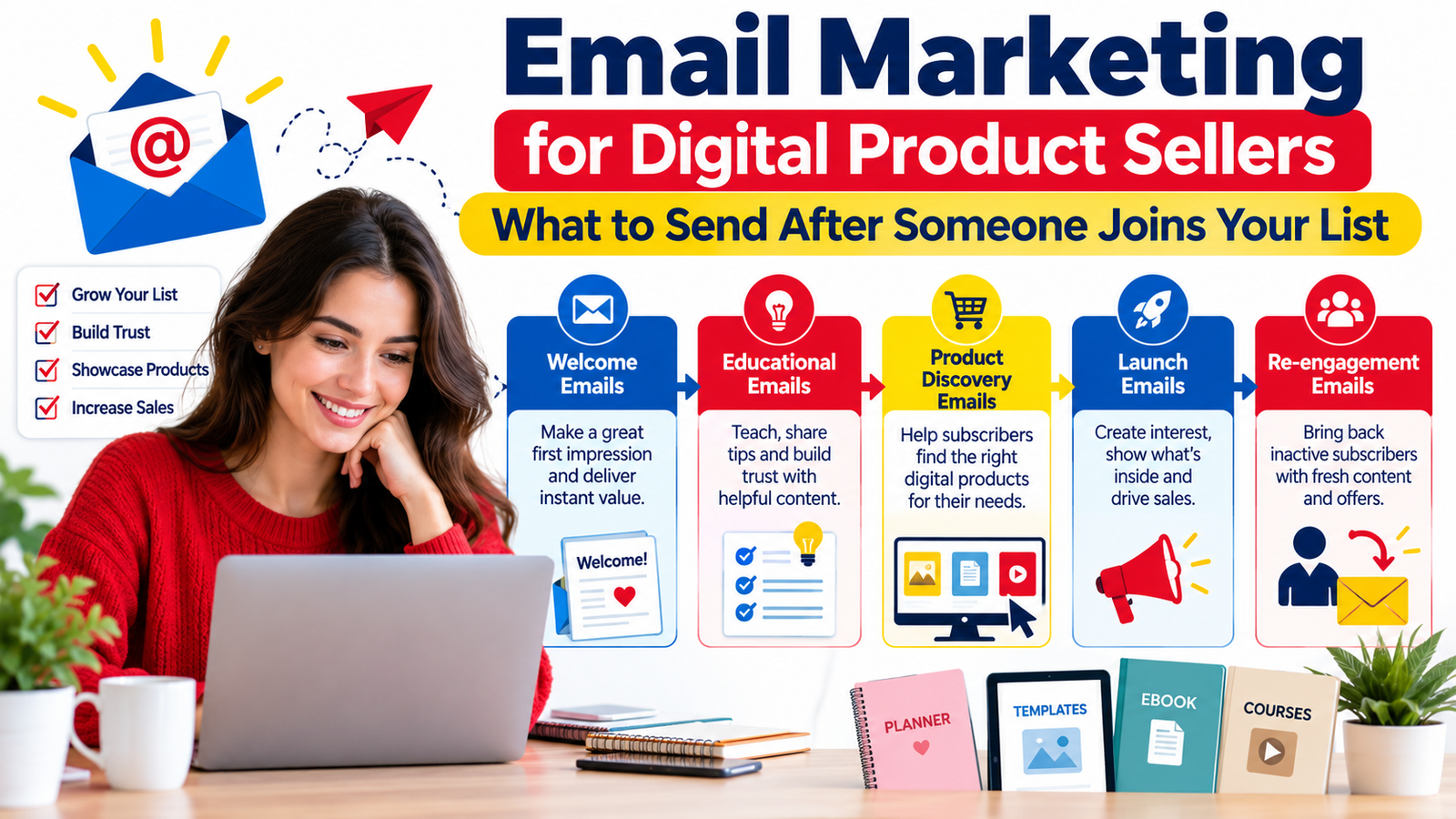
A strong digital product email strategy can be organized around five main categories:
- Welcome emails
- Educational emails
- Product-discovery emails
- Launch and promotional emails
- Re-engagement emails
You do not need to send all five immediately.
Each category plays a different role in the customer journey.
1. Welcome Emails: Make the First Impression Useful
The welcome email is one of the most important messages in your sequence because it arrives when interest is relatively fresh.
The subscriber has just taken an action.
Do not waste that moment with a generic message like:
“Thanks for subscribing. Watch your inbox for updates.”
Give them something useful.
Welcome Email #1: Deliver What You Promised
If someone joined to receive a free download, checklist, template, guide, or resource, make delivery the primary purpose of the email.
A simple structure works well:
Opening: Thank them for joining.
Delivery: Give them clear access to the resource.
Quick benefit: Explain what the resource will help them accomplish.
Next step: Tell them what to do first.
Expectation: Briefly explain what kinds of emails they can expect.
For example:
“Your Content Planning Checklist is ready. Start with the weekly planning section—it will help you turn scattered ideas into a simple publishing schedule.”
That is more useful than simply saying, “Download here.”
Welcome Email #2: Introduce Your Brand
Your second message can help subscribers understand who you serve and what they will gain by staying subscribed.
Avoid turning this into a lengthy company biography.
Readers usually care most about the relevance to them.
Explain:
- Who your resources are designed for
- What problems you help solve
- What kinds of products or content you create
- What readers can expect from future emails
If your digital product store helps small business owners save time through templates, make that clear.
If you create educational resources for parents and teachers, say so.
Clarity builds recognition.
Welcome Email #3: Send Your Best Resource
Instead of immediately selling, direct the subscriber to one of your most useful pieces of content.
This might be:
- A practical tutorial
- A beginner’s guide
- A checklist
- A case study
- A product comparison
- A how-to video
- A resource library
- A popular blog article
This gives subscribers a reason to keep opening your emails.
Welcome Email #4: Introduce a Relevant Product
Once you have established some context, introduce a product connected to the subscriber’s original interest.
Do not simply show the product.
Explain why it exists.
Instead of:
“Buy our Business Planner.”
Try the concept:
“If you are constantly switching between notebooks, spreadsheets and scattered task lists, the Business Planner brings your weekly priorities, projects and important numbers into one organized system.”
You are translating product features into a practical use case.
2. Educational Emails: Teach Before You Sell
One of the easiest ways to make email marketing feel overly promotional is to make every email about a product.
Educational emails prevent that.
They demonstrate expertise while giving subscribers a reason to stay even when they are not ready to purchase.
What Can You Teach?
Look at the problems surrounding your products.
If you sell social media templates, teach:
- How to plan one month of content
- How to reuse one idea across multiple platforms
- Common content-planning mistakes
- How to create a consistent visual system
If you sell budgeting templates, teach:
- How to categorize expenses
- How to review monthly spending
- How to create a simple cash-flow routine
- How to organize irregular expenses
If you sell author resources, teach:
- How to develop characters
- How to organize story ideas
- How to plan writing sessions
- How to track a manuscript
Each educational email can naturally connect to a product without turning into a hard sales pitch.
Use the Problem → Insight → Action → Product Structure
A useful format is:
Problem: Identify something the reader struggles with.
Insight: Explain why it happens.
Action: Give one practical solution.
Product: Mention your product only if it genuinely helps with the next step.
For example:
“You don’t necessarily need more content ideas. You may need a better system for organizing the ideas you already have.”
Then teach a simple organizational method.
At the end:
“If you want a ready-made structure for this process, our Content Planning Dashboard organizes ideas, deadlines and publishing status in one workspace.”
The education remains valuable even if the reader never buys.
That builds trust.
3. Product-Discovery Emails: Help Customers Find the Right Product
Digital stores often make the mistake of assuming customers understand the entire catalog.
They usually do not.
A customer might visit one product page and never realize you sell five other resources that would be more appropriate.
Product-discovery emails help solve this.
Send Products by Problem
Instead of:
“Here are five products from our shop.”
Try grouping products around an outcome.
Want to Organize Your Business?
Recommend:
- Business dashboard
- Expense tracker
- Project planner
- Client management template
Want to Improve Your Content Workflow?
Recommend:
- Content calendar
- Caption workbook
- Video planner
- Social media tracker
Starting an Online Store?
Recommend:
- Product research sheet
- Launch checklist
- Inventory dashboard
- Pricing calculator
- Customer-service templates
Problem-based discovery is usually easier for customers to understand than browsing a random catalog.
Use a “Start Here” Email
If your store has many products, create a Start Here email.
Divide customers into a few simple categories.
For example:
If you’re starting: Beginner starter kit
If you’re growing: Marketing and operations bundle
If you’re managing many projects: Business dashboard
If you’re creating content: Creator toolkit
This reduces decision fatigue.
Send “How People Use It” Emails
Showing practical use cases can make an abstract digital product easier to understand.
For example:
A spreadsheet is not exciting simply because it contains 12 worksheets.
Instead, explain:
“Use the Monday tab to plan priorities, update project status during the week, and check your monthly dashboard on Friday.”
Now the buyer can imagine using the product.
That is far more persuasive.
4. Launch Emails: Build Interest Before Asking for the Purchase
Launching a digital product does not require sending the same “Buy Now” email five times.
A launch becomes more engaging when each email answers a different customer question.
Email 1: The Problem
Start with the challenge the product addresses.
For example:
“Creating a new product may not be the hardest part of running a digital store. Keeping your research, pricing, launch schedule and marketing assets organized can be.”
Then introduce the problem your new resource was created to solve.
Email 2: The Solution
Reveal the product and explain what it does.
Focus on outcomes rather than listing every feature.
Email 3: Show What’s Inside
Give subscribers a more detailed look.
Depending on the product, you could show:
- Pages
- Worksheets
- Templates
- Modules
- Dashboards
- Mockups
- Before-and-after examples
- Screenshots
This email is particularly useful for digital products because customers cannot physically inspect them before purchasing.
Email 4: Address Questions
Turn common objections into an FAQ-style email.
Answer questions such as:
- Who is this for?
- What software do I need?
- Is it editable?
- Is it beginner-friendly?
- How is it delivered?
- Can I use it commercially?
- What exactly is included?
Be precise about licenses and usage rights.
If a product includes PLR, MRR, commercial-use rights, or other licensing, explain exactly what buyers may and may not do rather than relying on vague labels.
Email 5: Reminder
If your launch includes a genuine deadline, bonus, or temporary price, remind subscribers before it expires.
Avoid manufactured urgency.
A credible deadline is more valuable than repeatedly claiming something is “ending soon” when it never actually ends.
5. Re-Engagement Emails: Give Quiet Subscribers a Reason to Return
Not everyone who joins your list will keep opening.
That is normal.
People become busy. Interests change. Inboxes become crowded.
A re-engagement sequence can help you identify people who still want your content.
Re-Engagement Email #1: Send Something Worth Opening
Instead of starting with:
“We noticed you haven’t opened our emails.”
Send one of your strongest resources.
For example:
“Here are 10 digital product ideas you can create from skills you already have.”
Provide real value inside the email.
Re-Engagement Email #2: Let Them Choose Their Interests
Ask subscribers what they want to receive.
Possible options include:
- Digital product ideas
- Marketing strategies
- Templates and tools
- Creator resources
- Product launches
- Discounts and special offers
Interest-based segmentation can make future emails more relevant.
Re-Engagement Email #3: Ask Whether They Want to Stay
Give inactive subscribers a clear choice.
Keep receiving emails or unsubscribe.
A smaller engaged list can often be more useful than a larger list filled with people who no longer want your content.
What Should a Weekly Email Marketing Schedule Look Like?
There is no universal perfect frequency.
Consistency and relevance matter more than sending emails simply because a calendar says you should.
For many creator businesses, a simple schedule could look like:
Week 1
Educational tutorial
Week 2
Product use case
Week 3
Helpful resource or checklist
Week 4
Product discovery, promotion, or customer story
This creates a healthy balance between value and selling.
You can increase frequency during launches or seasonal campaigns if subscribers reasonably expect it.
A Simple 10-Email Welcome Sequence for Digital Product Sellers
If you want a practical starting point, consider this sequence:
Email 1 — Welcome + Free Resource
Deliver the promised resource immediately.
Email 2 — Your Best Quick Win
Teach one useful tactic related to the subscriber’s interest.
Email 3 — Your Story and Store Purpose
Explain why you create these resources and who they help.
Email 4 — Common Mistake
Teach readers how to avoid a frequent problem.
Email 5 — Product Discovery
Introduce one relevant product.
Email 6 — Tutorial
Show readers how to solve part of the problem themselves.
Email 7 — Product Use Case
Demonstrate how the product fits into a real workflow.
Email 8 — Helpful FAQ
Answer frequently asked questions.
Email 9 — Related Products
Introduce complementary resources or a bundle.
Email 10 — Ask About Their Interests
Let subscribers tell you what content they want next.
After this sequence, move them into your regular newsletter.
Use Segmentation to Make Emails More Relevant
Sending every subscriber exactly the same message is simple, but it becomes less effective as your store grows.
Useful segments might include:
- New subscribers
- Customers
- Non-buyers
- Repeat customers
- Course buyers
- Template buyers
- Freebie subscribers
- High-interest subscribers
- Inactive subscribers
You can also segment based on topics.
For example, a digital resource store might create categories such as:
Business
Marketing
Design
Education
Content Creation
Finance
A subscriber interested in business spreadsheets does not necessarily need every email about children’s printables.
Relevance protects attention.
Use Purchase Behavior Carefully
One of the advantages of email marketing is being able to recommend logical next steps.
Suppose someone purchases a social media planner.
A useful follow-up could introduce:
- Caption templates
- Content calendar
- Canva design kit
- Social analytics tracker
But do not immediately bombard the customer with unrelated products.
Start with the purchase experience.
Ask whether they successfully downloaded the product.
Show them how to use it.
Provide tips.
Then introduce complementary resources.
Customer support is part of marketing.
What to Send Immediately After a Digital Product Purchase
Post-purchase communication deserves its own strategy.
Purchase Email #1: Access Instructions
Explain exactly how to access the product.
Keep it simple.
Purchase Email #2: Getting Started
Show the customer the first thing they should do.
For a spreadsheet:
“Make a duplicate before editing.”
For a planner:
“Start with the monthly overview.”
For a course:
“Begin with Module 1 before downloading the bonus resources.”
Purchase Email #3: Usage Tips
Help customers get more value from what they bought.
Purchase Email #4: Feedback
Ask about their experience.
Useful customer feedback can reveal:
- Confusing instructions
- Missing features
- New product ideas
- Frequently asked questions
- Opportunities for tutorials
Purchase Email #5: Complementary Product
Only after helping them use their existing purchase should you introduce a logical next product.
Turn Customer Questions Into Email Content
Your support inbox can become an excellent source of email ideas.
If several people ask:
“How do I edit this template?”
Create an educational email explaining the process.
If customers ask:
“Which package should I buy?”
Create a comparison email.
If people ask:
“Can beginners use this?”
Create a beginner-focused use case.
If customers ask:
“What’s included in the bundle?”
Create a visual product breakdown.
Repeated questions often signal information customers need before making a purchasing decision.
Write Subject Lines for Humans, Not Algorithms
The goal of the subject line is not to sound clever.
It is to give the reader a genuine reason to open.
Examples for digital product sellers include:
Your template is ready
3 ways to use your new planner
A simpler way to plan next month’s content
Which business template should you start with?
5 things to organize before launching your next product
New: Our updated creator toolkit
Need help choosing the right bundle?
A quick system for organizing digital product ideas
Clarity usually beats exaggerated curiosity.
Avoid constant use of phrases such as:
“SHOCKING”
“Secret nobody knows”
“Guaranteed income”
“Make thousands instantly”
“Last chance” when it isn’t actually the last chance
Trust is difficult to build and very easy to damage.
Make Every Email Have One Primary Goal
One email does not need to:
Teach three lessons, promote six products, announce a sale, ask for a review, request a survey response and invite the subscriber to five social channels.
Choose one primary action.
For example:
Read the tutorial
Download the resource
View the template
Explore the bundle
Reply with a question
Choose your interests
Complete your purchase
Your email can contain supporting links, but the primary CTA should be obvious.
Better CTAs for Digital Product Emails
You do not have to use “Buy Now” everywhere.
Match the CTA to where the reader is in the decision journey.
For education:
Learn the Process
See the Full Guide
Try the Method
For product discovery:
Explore the Template
See What’s Included
View the Toolkit
Compare the Options
For launches:
Explore the New Product
See the Complete Bundle
For customers:
Start Using Your Template
Open Your Resource
See the Setup Guide
For re-engagement:
Choose What You Want to Receive
Specific CTAs help readers understand what happens after they click.
Use Email to Create Product Discovery, Not Just Discounts
Discounts can be useful, but a digital product business should not train customers to purchase only when something is on sale.
Alternative campaigns include:
Product of the Week
Feature one resource and demonstrate a specific use case.
Beginner’s Toolkit
Group related products designed for people starting out.
Resource Roundup
Collect useful products around one goal.
Customer Workflow
Show how several products work together.
Seasonal Collection
Highlight relevant resources for upcoming events or seasons.
Behind the Product
Explain why you created something and the problem it solves.
Tutorial + Template
Teach a process and offer the template that helps implement it.
These campaigns can generate commercial interest without relying entirely on price reductions.
Use Seasonal and Timely Email Campaigns
Some digital products naturally connect to seasonal demand.
For example:
January:
Goal planners, budget trackers, annual planning templates
Back-to-school season:
Student planners, teacher resources, worksheets
Holiday season:
Gift planners, holiday printables, social media templates
Wedding season:
Wedding planners, budgeting tools, invitation templates
Tax periods:
Financial trackers and bookkeeping templates
Business planning periods:
Annual calendars, strategy templates, goal dashboards
Plan these campaigns before interest peaks.
That gives subscribers enough time to discover, evaluate and use the product.
Build an Email Content Bank
If you struggle to decide what to send each week, create a reusable content bank.
Store ideas under several categories:
Teach
Tips, tutorials, checklists and processes.
Solve
Common problems and practical solutions.
Show
Product demos, screenshots and workflows.
Compare
Different approaches or products.
Answer
Frequently asked customer questions.
Share
Updates, stories and lessons.
Recommend
Products matched to specific needs.
Launch
New products and meaningful updates.
Whenever you need an email idea, choose from one of these categories.
Measure More Than Opens
Open rates can provide directional information, but they should not be your only measure of email performance.
Depending on your email platform and privacy changes affecting tracking, other indicators may provide more actionable insight.
Look at:
- Click-through activity
- Product page visits
- Purchases
- Conversion rate
- Revenue per campaign
- Unsubscribe rate
- Spam complaints
- Replies
- Lead magnet conversions
- Repeat purchases
The purpose of your email strategy should determine the metric.
An educational email may aim primarily for engagement.
A product-launch email may aim for sales.
A re-engagement email may aim to identify who still wants to remain subscribed.
Improve Email Marketing Through Testing
Testing does not have to become complicated.
Test one meaningful variable at a time.
You could test:
- Subject line approach
- Email length
- CTA wording
- Product positioning
- Send day
- Email frequency
- Educational versus promotional content
- Single-product versus collection emails
Avoid changing five things simultaneously.
Otherwise, you will not know what influenced the result.
Email Marketing for Creators Should Still Feel Personal
Automation is valuable because it saves time.
But automated email does not need to sound robotic.
Write as though you are explaining something useful to one person.
Instead of corporate language such as:
“Our organization is pleased to announce the availability of our latest digital solution.”
Use straightforward language:
“We created this planner for people who are tired of managing projects across scattered notes and spreadsheets.”
Simple language feels more human because people actually speak that way.
Think Beyond the First Sale
A strong digital product email strategy should not end after someone purchases.
The first sale is the beginning of a customer relationship.
A satisfied customer may later purchase:
- An upgraded version
- A complementary template
- A larger bundle
- A course
- A membership
- A commercial license
- A related resource
The best way to encourage that second purchase is usually to make the first product genuinely useful.
Excellent products make email marketing easier.
How Email Marketing Supports SEO and Organic Growth
Email itself is not a replacement for SEO, but the two channels can support each other.
Your emails can send interested readers to useful articles, tutorials, comparison pages and resource hubs.
Those pages can then introduce additional content and products.
For example:
Google Search → Helpful Article → Lead Magnet → Email List → Educational Sequence → Product Discovery → Purchase
Or:
Pinterest → Tutorial → Email Signup → Welcome Sequence → Product Page
This creates a broader customer-acquisition system instead of depending on one traffic source.
Creating Content With Google Search and Discover in Mind
If you publish this type of marketing content on your website, focus first on helping the reader solve the problem they searched for.
Google’s current guidance emphasizes helpful, reliable, people-first information rather than content created primarily to manipulate rankings. Google also recommends clear authorship where appropriate, descriptive rather than exaggerated page titles, and a strong overall page experience.
For article pages, appropriate Article or BlogPosting structured data can help Google better understand elements such as the headline, author, date and article imagery.
For stronger search and Discover presentation, combine technical optimization with:
- An original, useful article
- A descriptive headline
- A strong featured image
- Clear author information
- Accurate publication and modification dates
- Helpful internal links
- Mobile-friendly design
- Fast, uncluttered page experience
- Relevant structured data
- Useful examples and first-hand insight
- Regular updates when information genuinely changes
Do not rewrite publication dates simply to create artificial freshness. Update the content when there is something meaningful to improve.
A Practical Digital Product Email Strategy
If your email marketing currently feels complicated, simplify it.
Start with one welcome sequence.
Then send one useful regular email.
Introduce products when they genuinely connect to what the reader needs.
After a purchase, help the customer use what they bought.
As your list grows, add segmentation, product recommendations, launch campaigns and re-engagement automation.
The goal is not to send the maximum number of emails.
The goal is to send messages people are glad they opened.
When subscribers consistently receive useful information, relevant resources and products that solve real problems, email becomes more than a promotional channel.
It becomes part of the customer experience.
Frequently Asked Questions
1. How often should digital product sellers email their subscribers?
There is no single ideal frequency for every business. Many creators can start with one useful email per week and increase frequency during launches or important seasonal campaigns. The most important factors are consistency, relevance and subscriber expectations. Sending fewer high-quality messages is generally better than sending frequent emails with little value.
2. What should the first email after someone joins my list contain?
The first email should usually deliver whatever you promised during signup, such as a free template, guide, checklist or discount. It should also briefly welcome the subscriber, explain how to use the resource and tell them what kind of future content they can expect.
3. Should every email contain a product offer?
No. A healthy digital product email marketing strategy should include education, tutorials, useful resources, product discovery, customer support and occasional promotions. Selling becomes more natural when subscribers already understand the problem your product solves.
4. What types of digital products work well with email marketing?
Email can work well for ebooks, courses, printables, templates, planners, spreadsheets, design assets, presets, business kits, memberships, educational resources and many other downloadable products. The strongest campaigns connect email content directly to the problems those products help customers solve.
5. How can I turn subscribers into repeat digital product customers?
Start by delivering an excellent first purchase experience. Provide clear access instructions, onboarding help and practical usage tips. Then recommend complementary products based on what the customer already purchased. Relevant recommendations are generally more useful than repeatedly promoting unrelated products.
Build the Relationship Before Chasing the Sale
The most effective email marketing for creators is built around relevance.
A subscriber should gradually understand three things:
You understand the problem.
Your emails provide useful guidance.
Your digital products can make the next step easier.
Welcome emails establish the relationship.
Educational emails build trust.
Product-discovery emails connect needs with solutions.
Launch emails introduce something new.
Post-purchase emails help customers succeed.
Re-engagement emails reconnect with people whose attention has faded.
Put those pieces together and email stops being a collection of promotional broadcasts.
It becomes a customer journey.
Start with one useful welcome sequence, connect it to your strongest products and improve it based on what subscribers actually click, purchase and ask about.
That is how a digital product email strategy becomes a sustainable part of your online business.
Email Marketing for Creators, Digital Product Email Strategy, Email Marketing for Digital Products, Digital Product Sellers, Creator Email Marketing, Welcome Email Sequence, Digital Product Marketing, Sell Digital Products Online, Email List Building, Digital Product Business, Creator Marketing, Product Launch Emails, Email Sequence for Digital Products, Customer Re-Engagement Emails, Digital Product Sales Funnel, Email Marketing Tips, Online Business Marketing
Stay ahead with exclusive updates
Join our community. Get curated industry trends, actionable guides, and fresh resources delivered straight to your inbox.