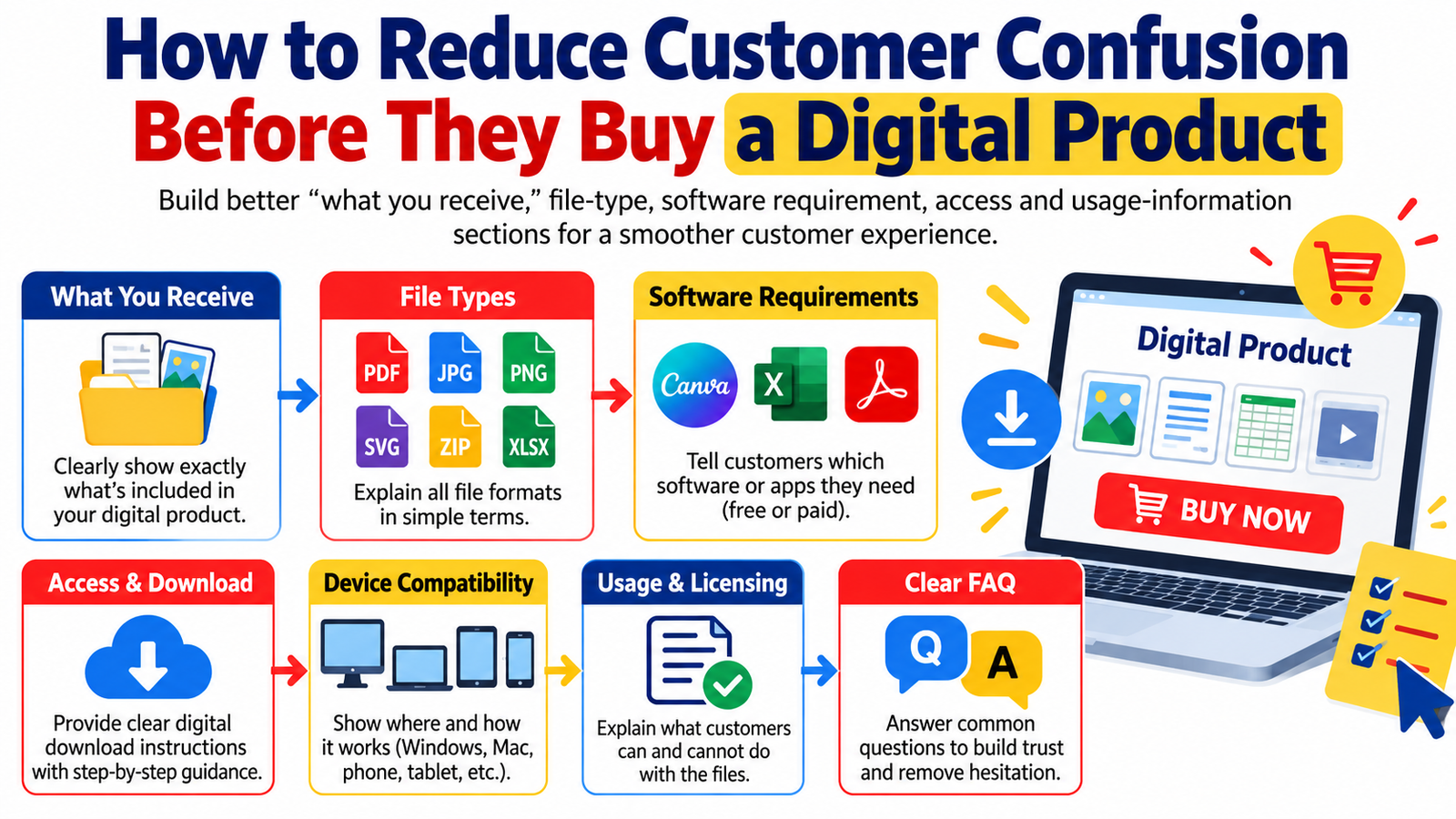
A customer should never have to guess what happens after clicking the Buy Now button.
Yet confusion is one of the most common problems on digital-product sales pages.
A shopper may like your template, eBook, printable, spreadsheet, course, design bundle, prompt pack, planner, or digital toolkit—but before purchasing, several questions can stop them:
What exactly will I receive?
Which file types are included?
What software do I need?
Will this work on my phone, tablet, Mac, or Windows computer?
How do I access the files?
Can I edit them?
Can I use them commercially?
Is this a physical item or a digital download?
When these questions remain unanswered, uncertainty grows. And uncertainty creates hesitation.
A better approach is to make your product page function as both a sales page and a simple pre-purchase instruction guide.
By clearly explaining what customers receive, file formats, software requirements, download access, compatibility, licensing, and usage instructions, you can create a smoother digital product customer experience and help shoppers make more informed buying decisions.
This guide explains how to reduce customer confusion before purchase and build clearer, more trustworthy digital product listings.
Why Customer Clarity Matters When Selling Digital Products
Physical products are usually easier for shoppers to understand.
A customer buying a notebook, lamp, shirt, or coffee mug can immediately picture what will arrive.
Digital products are different.
The customer may be purchasing something they cannot physically touch and may receive several files, folders, links, templates, instructions, or software-dependent formats.
For example, a single digital bundle might contain:
- PDF guides
- PNG graphics
- SVG files
- Canva templates
- Excel spreadsheets
- Google Sheets links
- ZIP folders
- editable documents
- fonts
- video tutorials
- licensing documents
To the seller, everything may seem obvious.
To a first-time buyer, it may not be.
The purpose of a strong product description is therefore not simply to convince someone that the product is useful. It should also help the buyer understand exactly what purchasing the product involves.
Good digital product customer experience begins before the transaction takes place.
Build a Clear “What You Receive” Section
One of the most valuable sections on any digital product page is a straightforward explanation of what the buyer receives.
Avoid vague descriptions such as:
“Massive premium bundle with everything you need.”
Instead, give customers specific information.
For example:
What You Receive
Your purchase includes:
- 50 editable social media templates
- 20 Instagram Story templates
- 30 square post designs
- PDF quick-start guide
- Canva editing link
- commercial-use license document
The files are delivered digitally. No physical product will be shipped.
This format immediately answers several questions.
The customer knows:
what is included,
how much content is included,
which formats are provided,
whether the files are editable,
and whether anything physical will arrive.
Use Quantities Carefully
If your product includes a specific quantity, make sure the number is accurate and easy to understand.
If you advertise “1,000 templates,” clarify whether this means:
1,000 unique templates,
500 templates in two sizes,
or a collection containing variations.
Transparency prevents disappointment after purchase.
Explain Every Important File Type
File extensions that seem completely normal to a designer or digital-product seller may be unfamiliar to customers.
Do not assume every buyer knows the difference between PDF, PNG, JPG, SVG, EPS, PSD, XLSX, DOCX, ZIP, or CSV.
Include a simple File Types Included section.
For example:
File Types Included
PDF: Used for instructions and printable pages.
PNG: High-quality graphics with transparent backgrounds where applicable.
JPG: Standard image files suitable for printing and digital use.
SVG: Scalable vector files commonly used with compatible cutting and design software.
XLSX: Microsoft Excel spreadsheet files.
ZIP: Compressed folders containing multiple product files. These must be extracted before individual files can be opened.
You do not need to turn your product description into a technical manual.
A short explanation is enough to prevent confusion.
State Software Requirements Before Purchase
Software compatibility should never be hidden in small print.
If a product requires a specific application, tell the customer clearly before checkout.
For example:
Software Requirements
To edit this product, you will need a free or paid Canva account.
Or:
Microsoft Excel 2019, Microsoft 365, or compatible spreadsheet software is recommended.
Or:
SVG files require compatible vector-editing, design, or cutting software.
If certain features only work with paid software, explain that too.
For example:
Basic customization can be completed with a free Canva account. Some premium stock elements may require Canva Pro unless you replace them with free alternatives.
That single sentence can prevent frustration later.
Separate “Required” Software From “Recommended” Software
There is an important difference between software that customers must use and software that simply provides the best experience.
Consider a spreadsheet.
If it functions in both Microsoft Excel and Google Sheets but certain advanced formulas work best in Excel, explain the distinction.
For example:
Recommended: Microsoft Excel 365
Also compatible with: Google Sheets for most basic features
Important: Some advanced formatting, macros, formulas, or automation features may not transfer perfectly between spreadsheet applications.
This communicates compatibility without making promises you cannot guarantee.
Clearly Explain Device Compatibility
Customers increasingly purchase digital products using mobile devices.
A buyer may discover your product on a phone, purchase it from the same device, and expect to start using it immediately.
Explain whether your product works best on:
- Windows computers
- Mac computers
- Android devices
- iPhones
- iPads
- tablets
- web browsers
If desktop use is recommended, say so.
For example:
You can download the files on mobile devices, but a desktop or laptop computer is recommended for extracting large ZIP folders and organizing the complete bundle.
This kind of digital download instruction can eliminate unnecessary support messages.
Explain Exactly How Customers Receive Their Purchase
Customers should understand the delivery process before they pay.
Create a simple How You Receive Your Files section.
For example:
How You Receive Your Purchase
After successful payment:
- You will receive access to the digital download.
- Download the supplied ZIP or PDF file.
- Extract the ZIP folder if required.
- Open the included instruction guide.
- Follow the links or instructions to access the product files.
If access happens through another platform, explain that.
For example:
Your purchase includes a PDF access guide containing the link to the resource library.
This matters particularly when large products cannot be delivered as one direct download.
Tell Buyers When Access Requires an Internet Connection
Some digital products are downloadable files.
Others depend on cloud services.
Examples include:
Canva templates,
Google Sheets,
Google Drive folders,
Notion templates,
online courses,
web-based applications,
membership resources,
and video libraries.
If your product requires an external service or internet connection, disclose it before purchase.
A clear statement could say:
An internet connection is required to access and edit the online Canva templates. Exported files can then be downloaded to your device.
Small details like this make the purchasing experience feel much more predictable.
Explain ZIP Files for Less Technical Buyers
ZIP files create a surprisingly common source of digital download confusion.
A customer may download a ZIP archive and assume the files are broken because they have not extracted the folder.
Include a short instruction such as:
Opening ZIP Files
Some resources are delivered inside compressed ZIP folders. After downloading the ZIP file, extract or unzip it before attempting to open the individual files.
For large bundles, downloading and extracting the files on a computer is generally easier than doing so on a mobile device.
Simple instructions can significantly improve the experience for first-time digital-product customers.
Make Editing Information Obvious
If customers can customize your product, explain exactly what they can edit.
Instead of saying:
“Fully editable.”
Say:
You can edit the text, font choices, colors, photographs, backgrounds, and basic layout elements in Canva.
If something cannot be edited, mention that too.
For example:
The illustrated artwork is supplied as flattened PNG files and individual illustration elements cannot be separated.
Clear limitations are often more useful than broad marketing claims.
Explain Printing Requirements for Printable Products
Printable products require their own set of expectations.
Tell customers:
the page size,
recommended paper,
whether files are designed for home or professional printing,
whether colors may vary,
and whether physical printing is included.
For example:
Printing Information
The planner is supplied as a digital PDF in US Letter and A4 sizes.
You may print the files at home or use a professional printing service.
Printed colors may vary slightly depending on the monitor, printer, ink, and paper used.
No printed product will be mailed.
This eliminates one of the most common misunderstandings involving printable products.
Clarify Digital Product Licensing
Customers frequently confuse ownership of a file with ownership of its intellectual-property rights.
A licensing section should answer questions such as:
Can customers use the product personally?
Can they use it for client work?
Can they sell finished products?
Can they redistribute the original files?
Can they modify and resell them?
If you sell PLR or MRR products, these distinctions become particularly important.
For example:
Usage Rights
This purchase includes commercial-use rights for creating permitted end products.
You may not redistribute, share, upload, or sell the original source files unless your included license specifically grants redistribution or resale rights.
Always make your license match the rights you actually own and are legally permitted to transfer.
Do not advertise PLR, MRR, commercial use, or resale rights unless those rights genuinely apply.
Add a “Before You Buy” Box
A short pre-purchase summary can help customers confirm compatibility quickly.
For example:
Before You Buy
Please confirm that:
- you understand this is a digital product
- your device can open the included formats
- you have access to the required software
- you understand how the product will be delivered
- you have reviewed the usage license
- you understand what is and is not included
This section can be particularly useful immediately above the purchase button.
Show Product Previews That Match What Customers Receive
Words explain the product.
Visuals help customers understand it.
Use representative previews such as:
screenshots,
sample pages,
spreadsheet previews,
template mockups,
dashboard views,
folder previews,
before-and-after examples,
or short product demonstrations.
However, make sure promotional mockups do not accidentally create false expectations.
If a mockup displays a tablet, laptop, book, frame, or phone purely for presentation purposes, state that those physical objects are not included.
For example:
Device mockups are shown for presentation purposes only. Your purchase includes digital files only.
Build a Useful Digital Product FAQ
A strong digital product FAQ should focus on questions customers genuinely ask.
Do not create questions simply to repeat keywords.
Useful topics include:
file formats,
software requirements,
downloads,
device compatibility,
editing,
printing,
commercial use,
updates,
support,
refund policies,
and troubleshooting.
Well-written FAQs can also help search engines and AI-powered discovery systems understand the context and entities associated with a page.
Google recommends building helpful, reliable content primarily for people rather than creating pages mainly to manipulate rankings.
That makes genuine customer questions much more useful than mechanically inserting phrases such as “digital product FAQ” dozens of times.
Use Plain Language Instead of Technical Jargon
Compare these two descriptions:
“Includes SVG vector assets with fully scalable paths.”
And:
“SVG files are included for compatible vector-design and cutting software. Because SVG is a vector format, the artwork can generally be resized without the same pixelation associated with standard raster images.”
The second explanation teaches the buyer what the format means.
Your customer should not need industry knowledge to understand your listing.
Create a Simple Customer Journey
Think about your digital product page as a sequence.
The customer should be able to move naturally through:
Problem → Solution → Product → Contents → Compatibility → Access → Usage → FAQ → Purchase
For example:
What It Is
Explain the purpose of the product.
Who It Is For
Identify the people most likely to benefit.
What You Receive
List everything included.
File Formats
Explain the files.
Software Requirements
State required applications.
Compatibility
Explain supported devices or platforms.
How Delivery Works
Describe download or access steps.
How to Use It
Give a short getting-started explanation.
License
Explain permitted usage.
FAQ
Answer remaining questions.
Call to Action
Invite the informed customer to purchase.
This structure supports both usability and commercial intent.
Make Your Calls to Action Match the Customer’s Confidence Level
A good CTA does not have to sound aggressive.
After explaining compatibility, you might use:
Check the requirements above, then get instant access to the digital files.
After explaining what is included:
Everything listed above is included in your download—get the complete resource package today.
After an FAQ:
Ready to start? Purchase the digital product and follow the included quick-start instructions to begin.
The objective is not to pressure customers.
It is to make the next action obvious once their questions have been answered.
Optimize for SEO Without Making the Page Sound Artificial
A useful digital product article or product page can naturally include search terms such as:
digital product FAQ,
digital download instructions,
digital product customer experience,
how to download digital products,
digital file formats,
digital product software requirements,
digital product compatibility,
digital download help,
digital product licensing,
instant digital download,
how digital downloads work,
and what you receive with a digital product.
The important word is naturally.
Do not force all phrases into every section.
Search visibility increasingly depends on whether the page genuinely satisfies the visitor’s intent.
Someone searching for “how to download a digital product” probably wants clear instructions.
Someone searching for “what software do I need for digital templates” wants compatibility information.
Someone searching for a “digital product FAQ” wants practical answers.
Build sections that solve those needs directly.
Write for GEO and AI-Powered Discovery
Generative search systems benefit from content that clearly defines concepts and answers specific questions.
Make your article easier to understand by using:
descriptive headings,
direct answers,
short definitions,
clear product terminology,
specific examples,
step-by-step instructions,
and logically grouped information.
Instead of writing a vague paragraph about downloads, use a heading such as:
How Do Customers Access a Digital Download After Purchase?
Then answer the question immediately.
This improves usability for readers while also creating clear semantic context around the subject.
Strengthen Trust With Author and Update Information
Trust signals matter.
For educational articles about digital commerce, consider displaying:
the author’s name,
relevant experience,
publication date,
last-updated date,
editorial policy,
and references where appropriate.
Avoid changing the publication date merely to make older material appear new. Update the actual content when important information changes.
A trustworthy page should help readers identify who created the content and why they should rely on it.
Improve Google Discover Readiness
No technique can guarantee placement in Google Discover.
However, publishers can improve the quality and presentation of their content.
Use a concise, descriptive headline that accurately represents the article rather than sensationalizing the subject.
Use a compelling, relevant featured image.
Google’s current documentation says it can use both schema.org information and the og:image meta tag when determining preferred images for Google Search and Discover.
For article structured data, Google recommends relevant, crawlable images and suggests providing high-resolution versions in useful aspect ratios such as 16:9, 4:3, and 1:1.
For a WordPress article, a strong implementation could therefore include:
- an original featured image at least 1200px wide
- descriptive image alt text
- a relevant
og:image ArticleorBlogPostingstructured data- accurate author information
- date published and date modified
- a fast, mobile-friendly page
- prominent main content
- limited intrusive advertising
- clear internal navigation
Google also advises looking at page experience as a whole rather than focusing on one isolated signal. Mobile usability, secure delivery, Core Web Vitals, intrusive interstitials, and the ability to distinguish the main content are among the considerations it highlights.
Recommended SEO Title
How to Reduce Customer Confusion Before Selling a Digital Product
Suggested Meta Description
Learn how to create clearer digital product listings with better file information, software requirements, download instructions, licensing details, FAQs, compatibility guidance, and customer support information.
Suggested URL Slug
/reduce-digital-product-customer-confusion/
Primary Keyword
digital product customer experience
Supporting Keywords
digital product FAQ
digital download instructions
digital product file types
digital product software requirements
digital product compatibility
digital download customer support
digital product usage instructions
how to sell digital downloads
5 Frequently Asked Questions About Digital Product Purchases
1. What information should a digital product listing include before a customer buys?
A strong listing should explain what the buyer receives, quantities, file formats, required software, device compatibility, delivery method, editing options, licensing terms, usage limitations, and available support. The objective is to give customers enough information to decide whether the product fits their needs before purchasing.
2. How should sellers explain digital download instructions?
Use a simple sequence. Tell customers what happens after checkout, where the download appears, whether they receive a ZIP or PDF file, whether files must be extracted, whether an external link is involved, and what they should open first. Keep technical instructions short and beginner-friendly.
3. Should I list software requirements for digital products?
Yes. If customers need Canva, Microsoft Excel, Adobe software, a cutting-machine application, a PDF reader, or another platform, disclose it clearly before purchase. Also explain whether a free account is sufficient or whether paid software or premium features may be required.
4. How can a digital product FAQ improve customer experience?
A useful FAQ answers remaining questions before customers need to contact support. It can address downloads, compatibility, printing, editing, commercial use, licensing, access, account requirements, and troubleshooting. This makes the buying process easier and can reduce uncertainty.
5. What is the easiest way to reduce confusion when selling digital downloads?
Create a standardized information structure for every listing: What You Receive, File Types, Software Requirements, Compatibility, How to Access, How to Use, License, Important Notes, Support, and FAQ. When customers can quickly locate these answers, the entire purchase experience becomes simpler.
Turn Clarity Into Part of the Product
A well-designed digital product is only part of the customer experience.
The other part is helping customers understand exactly what they are buying and what happens next.
Clear information about contents, file types, compatibility, software requirements, download access, editing, licensing, usage, and support removes unnecessary uncertainty from the purchasing process.
That clarity can also make your business feel more professional.
Customers should be able to arrive on your page, understand the offer, confirm that the product works for them, know how they will receive it, and make their purchase decision without searching through confusing descriptions or contacting you for basic information.
Before publishing your next digital product, read the listing from the perspective of someone who has never purchased a digital download before.
Ask:
What am I receiving?
Can I open it?
What software do I need?
How will I get it?
What am I allowed to do with it?
When those five questions are answered clearly, you have already removed many of the biggest barriers between customer interest and a confident purchase.
Make the product easy to understand before you ask the customer to buy it.
Stay ahead with exclusive updates
Join our community. Get curated industry trends, actionable guides, and fresh resources delivered straight to your inbox.