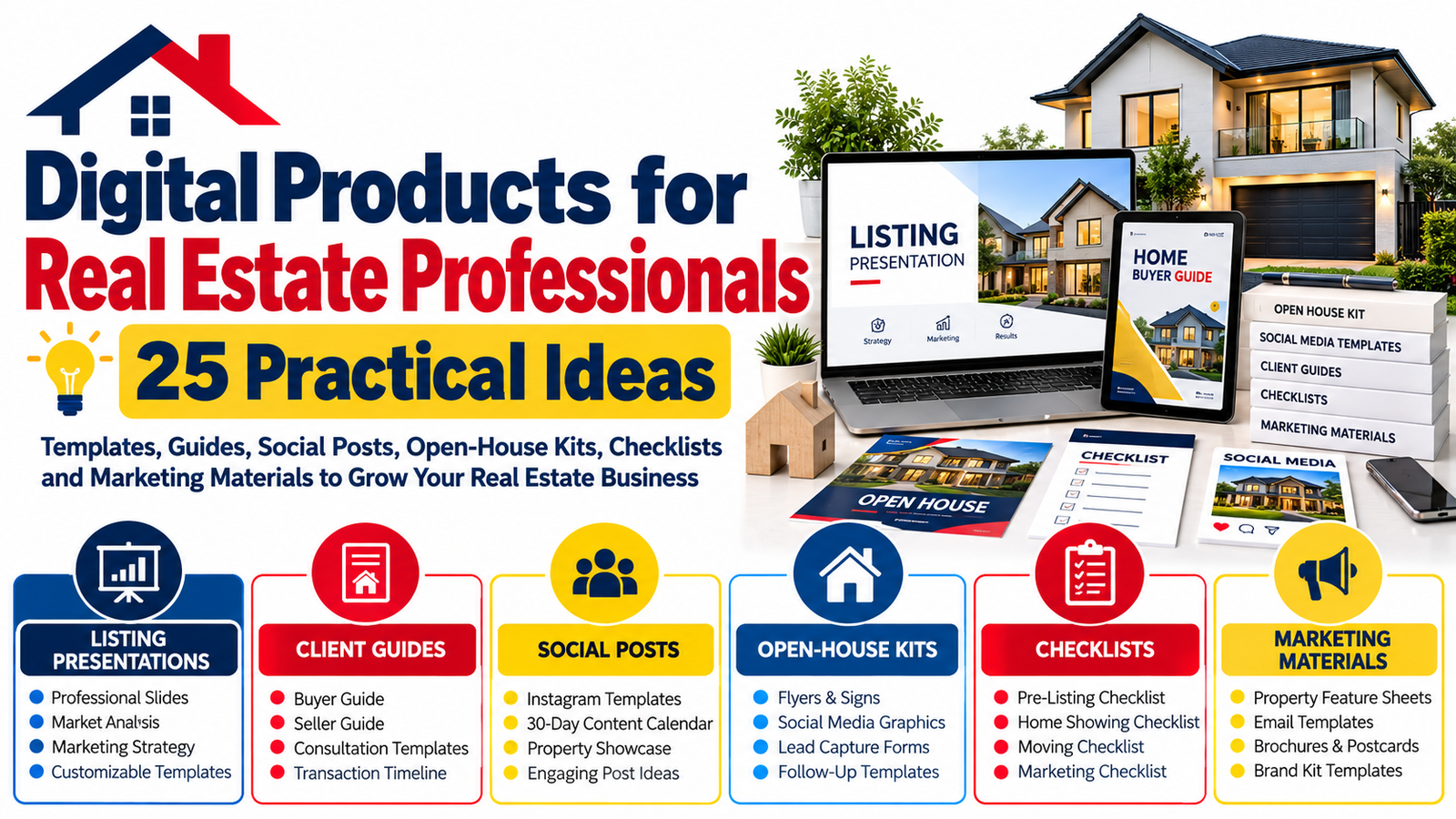
Real estate professionals constantly need fresh marketing materials, organized client resources, attractive property presentations, social media content, and systems that save time.
That creates a valuable opportunity for digital product creators.
Instead of producing another generic planner or social media template, you can build real estate digital products around specific problems agents, brokers, property managers, home stagers, real estate teams, and independent Realtors face every week.
Think listing presentations that can be customized in minutes. Buyer guides that explain confusing steps in plain language. Open-house kits that keep every event organized. Social media templates that help agents maintain a professional online presence without designing every post from scratch.
These products are useful because they combine two things real estate professionals value: professional presentation and saved time.
Whether you are a designer looking for a profitable template niche, a real estate professional creating resources for your own business, or a digital seller building a specialized product store, the following 25 ideas offer practical places to start.
What Are Real Estate Digital Products?
Real estate digital products are downloadable or editable resources created specifically for professionals working in property sales, rentals, marketing, property management, or related services.
Common formats include:
Canva templates, PDF guides, editable presentations, checklists, spreadsheets, social media graphics, email templates, printable forms, marketing kits, worksheets, client information packs, and content planners.
Unlike physical promotional materials, a digital template can often be duplicated, customized, updated, and reused.
For sellers, that creates the possibility of developing a product once and selling licenses repeatedly, depending on the licensing model.
For real estate professionals, it can reduce repetitive design and administrative work.
The strongest products usually solve one clear problem rather than simply looking attractive.
Why Real Estate Templates Have Strong Practical Value
A real estate agent may need to prepare a listing presentation today, promote an open house tomorrow, send a buyer guide this weekend, and create several social posts before Monday.
That is a considerable amount of content creation.
Well-designed real estate templates give professionals a starting point instead of a blank page.
They can also help create visual consistency across different customer touchpoints. A listing presentation, Instagram post, property brochure, email header, buyer guide, and open-house sign can all follow the same brand style.
For digital product sellers, specialization can make products easier to position.
“Editable Canva templates” is broad.
“Editable luxury real estate listing presentation templates for independent agents” speaks to a much clearer customer and use case.
That difference matters.
25 Practical Digital Product Ideas for Real Estate Professionals
1. Editable Real Estate Listing Presentation
A listing presentation is one of the most useful realtor marketing templates you can create.
Agents can use it when meeting homeowners who are considering selling their property.
A comprehensive template could include sections for:
Agent introduction, brokerage information, marketing strategy, property positioning, photography plan, online marketing, comparable market information placeholders, communication process, showing strategy, transaction timeline, testimonials, and next steps.
Keep statistics and market numbers editable rather than inserting unsupported claims.
Product opportunity: Create separate modern, luxury, minimalist, commercial, and first-time-seller versions.
2. Home Seller Guide
Selling a home can feel complicated to someone experiencing the process for the first time.
A professionally designed seller guide can explain the process from preparation through closing.
Useful sections include home preparation, photography, pricing discussions, showings, offers, inspection, appraisal, closing preparation, moving reminders, and questions to ask an agent.
Create it as both an editable template and a ready-to-customize PDF.
Agents can then add their branding, contact information, local processes, and brokerage disclosures.
3. First-Time Home Buyer Guide
First-time buyers frequently need more education than experienced homeowners.
That makes a buyer guide one of the most practical digital products for real estate professionals.
Topics might include:
How the buying process works, preparing finances, getting pre-approved, identifying priorities, viewing properties, making an offer, inspections, appraisal, closing costs, closing day, and moving preparation.
Avoid giving individualized financial or legal advice. Encourage agents to customize sections to reflect local rules, lenders, contracts, and transaction practices.
4. Buyer Consultation Presentation
A buyer consultation template helps agents structure their first substantial conversation with potential buyers.
The presentation can guide clients through expectations before property searches begin.
Useful slides might cover:
Agent services, buyer responsibilities, financing preparation, desired property characteristics, search strategy, showing expectations, offer procedures, communication preferences, important milestones, and next steps.
A polished template can make the consultation feel organized without forcing every agent to build the presentation from scratch.
5. Open House Marketing Kit
Instead of selling one open-house flyer, create a complete open house digital marketing kit.
Include editable materials for social media announcements, reminder posts, property feature sheets, directional signage, welcome signs, registration forms, follow-up cards, Instagram Stories, email banners, and post-event follow-up messages.
Selling coordinated kits increases their usefulness because everything follows one visual identity.
Create versions for modern homes, luxury listings, apartments, suburban properties, and commercial properties.
6. Open House Checklist
Not every valuable digital product needs dozens of pages.
A carefully organized checklist can solve an immediate problem.
An open-house checklist could be divided into:
Before the event, 48 hours before, event morning, during the open house, after visitors leave, lead follow-up, and seller reporting.
Consider offering printable PDF, fillable PDF, and editable Canva versions.
A checklist can also work as a low-cost entry product that introduces customers to larger real estate template bundles.
7. Real Estate Social Media Template Pack
Agents need regular content but often struggle to design every social graphic individually.
Create a coordinated collection of real estate social media templates for posts such as:
New listing, just listed, open house, under contract, sold, price update, buyer tip, seller tip, neighborhood feature, testimonial, market update, property feature, FAQ, behind the scenes, agent introduction, and contact CTA.
Avoid creating only promotional posts.
A useful template library should help an agent educate and engage an audience as well as advertise listings.
8. 30-Day Real Estate Content Calendar
Many professionals know they should post online but do not know what to publish consistently.
A real estate content calendar solves the idea problem.
Create 30 days of prompts covering property education, local community content, buyer questions, seller questions, behind-the-scenes posts, testimonials, personal brand content, market information, listing promotion, and engagement posts.
For additional value, combine the calendar with caption prompts and matching Canva graphics.
9. Real Estate Instagram Story Templates
Stories require a different design approach from standard feed posts.
Create vertical templates for:
Property polls, this-or-that questions, new listings, open-house countdowns, neighborhood quizzes, property features, buyer FAQs, seller tips, testimonials, question boxes, market updates, and agent introductions.
Leave enough space for interactive platform elements such as polls, questions, links, and location stickers.
10. Property Feature Sheet Template
A property feature sheet gives prospective buyers a concise overview of a home.
Build an editable design with areas for:
Property photos, address, bedrooms, bathrooms, approximate size, important features, upgrades, outdoor features, location highlights, agent details, brokerage branding, and QR code placement.
Offer portrait and landscape versions.
Agents should verify all property information before publishing the completed material.
11. Real Estate Email Newsletter Template Pack
Email remains useful for keeping past clients, prospects, and local contacts connected with an agent’s brand.
Create newsletter templates for:
Monthly market updates, new listings, recent sales, neighborhood news, homeowner tips, seasonal maintenance, local events, buyer education, seller education, and client success stories.
A companion subject-line idea sheet can add value without significantly increasing production complexity.
12. Real Estate Lead Follow-Up Email Templates
Lead generation becomes less useful when follow-up is inconsistent.
Create customizable email templates covering common scenarios such as:
New website inquiry, open-house attendee, listing inquiry, buyer consultation follow-up, seller inquiry, past-client check-in, inactive lead re-engagement, appointment confirmation, post-closing message, and referral thank-you.
These should act as starting frameworks, not robotic scripts.
Encourage customers to personalize messages before sending them.
13. Real Estate Client Welcome Packet
Once someone becomes a client, a polished welcome packet can immediately explain what happens next.
A buyer version might include communication expectations, availability, search process, required documents, showing procedures, offer basics, and frequently asked questions.
A seller version could explain home preparation, photography, scheduling, marketing, showing feedback, offers, and communication.
Sell buyer and seller packets separately or as a bundle.
14. Home Showing Checklist for Buyers
A showing checklist helps buyers evaluate properties more systematically.
Useful categories include:
Layout, natural light, storage, room sizes, visible property condition, neighborhood observations, commute considerations, outdoor space, renovation needs, parking, and questions to investigate further.
Avoid encouraging buyers to treat a basic checklist as a substitute for professional inspection or specialist advice.
That distinction improves the usefulness and credibility of the resource.
15. Home Seller Preparation Checklist
Create a room-by-room checklist that helps sellers prepare before photography or showings.
Possible sections include:
Exterior, entrance, living room, kitchen, bathrooms, bedrooms, storage areas, lighting, decluttering, personal items, pets, odors, outdoor areas, and final pre-showing checks.
A companion “photo day checklist” can make a natural upsell.
16. Moving Checklist and Planner
Moving resources can extend an agent’s usefulness beyond the transaction itself.
Create a planner covering:
Packing schedule, utility changes, address updates, moving-company information, important documents, school arrangements, pet preparation, essentials box, moving-day tasks, cleaning, key collection, and post-move reminders.
This can be offered as a client gift template that agents personalize with their own branding.
17. Neighborhood Guide Template
Real estate decisions are often connected to lifestyle and location as well as the property.
Create a neighborhood guide template with customizable sections for:
Area overview, transportation, parks, recreation, shopping, restaurants, community resources, nearby services, housing characteristics, and useful local contacts.
Agents should verify local information and avoid language that could violate housing or advertising rules.
A neighborhood template should focus on objective, useful information rather than steering prospective residents toward or away from particular communities.
18. Real Estate Testimonial Templates
Client testimonials can be difficult to present consistently across different platforms.
Create testimonial graphics for:
Instagram posts, Stories, Facebook, LinkedIn, websites, email newsletters, listing presentations, and printable marketing pieces.
Include layouts for short quotes, longer testimonials, photo testimonials, and review screenshots.
Customers should only use genuine testimonials and should follow applicable disclosure, advertising, brokerage, and platform requirements.
19. Real Estate Agent Brand Kit
Independent agents often want a consistent visual identity but may not need a complete custom branding service.
A semi-custom brand template kit could include:
Color palette worksheets, typography combinations, logo placement guidance, business card templates, email signature layouts, social media headers, Instagram templates, presentation covers, flyer templates, and brand guidelines.
Avoid including fonts, photos, graphics, or logos that customers do not have permission to use commercially.
20. Real Estate Marketing Planner
Create a digital or printable marketing planner specifically for agents.
Possible sections include:
Monthly objectives, listing marketing schedule, content calendar, email schedule, social campaigns, lead sources, referral outreach, client follow-ups, open houses, networking, advertising expenses, campaign observations, and monthly review.
An editable spreadsheet version can complement the printable planner.
21. Property Marketing Campaign Checklist
A listing requires many coordinated activities.
Build a master marketing checklist showing tasks that can be considered before and during a listing campaign.
Examples include:
Photography preparation, property description, listing information verification, website publishing, portal distribution, social posts, email promotion, brochures, open-house promotion, signage, agent outreach, seller updates, and campaign review.
Because local listing systems and brokerage procedures differ, make the checklist customizable.
22. Real Estate Farming Marketing Kit
Geographic farming involves building visibility within a defined area over time.
A digital template kit could include:
Postcards, neighborhood update cards, market snapshot layouts, homeowner tips, seasonal reminders, introductory letters, community-event graphics, email templates, and social posts.
Keep the templates flexible enough for agents to insert verified local market data rather than embedding generic statistics.
23. Real Estate Referral Kit
Past clients and professional relationships can be important referral sources.
Create templates for:
Referral request emails, referral thank-you notes, social referral graphics, client appreciation messages, anniversary messages, check-in cards, referral tracking sheets, and partner introduction materials.
The tone should remain relationship-focused rather than overly aggressive.
24. Real Estate Transaction Timeline Template
Clients often want to know, “What happens next?”
A visual timeline can help explain the major stages of a transaction.
Create customizable buyer and seller versions containing general stages such as:
Preparation, property search or listing launch, offers, contract stage, inspections where applicable, appraisal or financing milestones where applicable, documentation, closing preparation, and completion.
Because transaction procedures vary significantly by jurisdiction, agents should edit the timeline for their market rather than presenting a generic template as legally authoritative.
25. Complete Realtor Marketing Template Bundle
Once you have several individual products, combine complementary resources into a premium bundle.
For example, a realtor marketing templates bundle might contain:
A listing presentation, buyer guide, seller guide, open-house kit, 30-day content calendar, social templates, property feature sheets, email templates, client welcome packet, checklists, neighborhood guide, testimonial templates, and marketing planner.
The key is organization.
Do not simply place hundreds of random files into one download.
Create clearly named folders, a visual index, an instruction guide, editable links, licensing information, and a “Start Here” document so customers immediately understand what they received.
Which Real Estate Digital Products Should You Create First?
Start with a problem that occurs frequently.
For example, an agent may need social content every week but prepare a full listing presentation less frequently.
That could make a social media template pack attractive for recurring use.
On the other hand, listing presentations address an important business moment, potentially making a professionally designed presentation particularly valuable.
A practical starter collection might combine a listing presentation, buyer guide, seller guide, open-house kit, property feature sheet, social media templates, and marketing checklist.
Once customers begin using these resources, their questions can reveal what you should create next.
How to Make Real Estate Templates More Valuable
Beautiful design is useful, but usefulness should guide the product.
Make every template easy to edit. Use clear placeholders. Maintain consistent spacing. Include instructions where necessary. Design pages for realistic amounts of text rather than perfect-looking demo copy.
When using Canva or another platform, clearly tell buyers whether they need a free or paid account and identify any premium elements included in the demonstration.
Customers should also understand exactly what they receive before purchasing.
State the file format, dimensions, number of templates, editable elements, software requirements, delivery method, printing expectations, license terms, and anything that is not included.
Clarity reduces disappointment and makes the purchasing decision easier.
Build Products Around Specific Real Estate Customers
“Real estate professionals” is a large market.
Your products can become easier to position when they serve a narrower customer.
You might specialize in templates for luxury agents, new Realtors, commercial agents, property managers, real estate teams, vacation-rental professionals, apartment leasing professionals, independent brokers, home stagers, or real estate photographers.
You can also build products around situations.
Examples include first listing appointments, new-agent marketing, open houses, buyer onboarding, seller onboarding, past-client follow-up, personal branding, social media consistency, and neighborhood marketing.
Specific problems often produce more compelling products than generic template collections.
Turn One Product Into a Product Line
Suppose you begin with a seller guide.
That single idea can expand into a seller consultation presentation, seller preparation checklist, photography checklist, showing checklist, seller FAQ, listing marketing plan, weekly seller-update template, closing checklist, moving planner, and post-sale follow-up pack.
You have now moved from one downloadable product to an interconnected collection.
The same strategy works with buyer resources, open houses, content marketing, lead follow-up, and agent branding.
This approach makes it easier to create bundles and logical upsells without filling your shop with unrelated products.
Real Estate Template Design Tips
Real estate marketing usually benefits from strong visual hierarchy and plenty of breathing room.
Keep important information easy to locate.
Use large property photography areas where appropriate. Maintain consistent fonts, spacing, margins, and heading styles. Make contact information visible without allowing it to dominate every page.
Create designs that are customizable enough to work with different agent brands.
Instead of making every template heavily dependent on one color scheme, allow customers to quickly replace colors and images.
A product becomes more useful when a buyer can make it feel like their own.
What to Include With Every Digital Product
A professional download should explain itself.
Consider including a short “Start Here” document containing instructions, software requirements, customization steps, download information, printing guidance where relevant, license terms, customer-support information, and links to included resources.
If your product contains multiple files, provide an index.
If it contains many templates, use descriptive filenames instead of names such as “Template 01” and “Template 02.”
Someone should be able to open the package and understand what to do without searching through dozens of folders.
Licensing and Compliance Matter
Real estate is highly location-dependent.
Advertising requirements, brokerage rules, listing-system policies, required disclosures, fair-housing obligations, privacy rules, intellectual-property requirements, and professional regulations may vary by location.
For that reason, digital templates should usually provide editable frameworks instead of pretending to replace legal, regulatory, brokerage, financial, inspection, or professional advice.
Do not supply fabricated market statistics, invented testimonials, unlicensed photography, misleading certifications, or unsupported promises.
Make space for users to insert verified information.
If you sell templates commercially, also explain what your own product license permits. Customers should know whether they can use the template only for their business, use it for client work, or resell modified versions.
Clear licensing protects both the buyer and creator.
How to Position Real Estate Digital Products for Search
People rarely search only for “digital products.”
They search for solutions.
Useful search-focused product and article topics may naturally include phrases such as real estate digital products, real estate templates, realtor marketing templates, real estate Canva templates, open house templates, listing presentation template, buyer guide template for Realtors, seller guide template, real estate social media templates, and real estate marketing materials.
Use these phrases when they accurately describe the content.
Do not force every keyword into every paragraph.
A page that genuinely answers what someone came to find is more useful than one written around repetitive keyword placement.
Create Content That Supports the Product
If you sell real estate templates, your blog can answer the questions customers ask before purchasing.
For example:
You could publish articles explaining how to create a listing presentation, what to include in an open-house kit, how to organize real estate social media content, how to create a client welcome packet, or how to customize Realtor marketing templates.
Each article can naturally introduce a relevant product.
Instead of:
“BUY OUR TEMPLATE NOW!”
Use a contextual call to action such as:
Want to skip the blank page? Start with an editable real estate template and customize the branding, images, property information, and messaging for your business.
That feels more useful because the product is presented as the next step to a problem the reader is already trying to solve.
Build a Real Estate Digital Product Library That Saves Time
The strongest real estate digital products are rarely complicated simply for the sake of appearing valuable.
They make recurring work easier.
A well-structured listing presentation helps an agent prepare for an important meeting. A buyer guide reduces repeated explanations. An open-house kit keeps marketing coordinated. Social templates reduce design work. A transaction timeline gives clients a clearer picture of the process.
Start with one problem.
Create a resource that solves it exceptionally well.
Then pay attention to what users need before and after that problem. Those adjacent needs can become your next product, bundle, guide, checklist, or template collection.
Ready to create your first real estate digital product? Choose one repeated task—listing presentations, buyer education, open-house promotion, social media, or client onboarding—and turn your process into an organized, editable resource that another professional can use.
Frequently Asked Questions
What are the best digital products to create for real estate agents?
Some of the most practical options include listing presentation templates, buyer and seller guides, open-house kits, social media templates, property feature sheets, email templates, client welcome packets, marketing planners, and checklists. The best starting point is usually a resource that solves a recurring task for a clearly defined type of real estate professional.
Can I sell real estate templates made in Canva?
You can create products using Canva, but you need to follow Canva’s current licensing and content-use requirements, as well as the licenses attached to any third-party photos, fonts, graphics, or other assets you use. Buyers should also be told whether your template requires Canva Free or specific premium features. Review the applicable platform terms before commercial distribution.
Who can buy realtor marketing templates?
Potential customers include independent real estate agents, brokers, real estate teams, property managers, leasing professionals, new agents, real estate marketers, home stagers, photographers, and related service providers. A product designed for one specific customer group can often be easier to explain and market than a generic product intended for everyone.
What should be included in a real estate digital product bundle?
A useful bundle can contain complementary resources such as listing presentations, buyer guides, seller guides, social posts, open-house materials, checklists, property sheets, email templates, marketing planners, and client onboarding materials. Include a Start Here guide, logical folders, clear filenames, customization instructions, software requirements, and understandable licensing information.
How can I make real estate templates stand out from competitors?
Focus on usefulness before quantity. Choose a specific audience, solve a clearly defined problem, create a consistent visual system, provide realistic layouts, make customization easy, include useful instructions, and organize files professionally. A smaller collection built around a complete workflow can be more appealing than hundreds of unrelated designs.
Stay ahead with exclusive updates
Join our community. Get curated industry trends, actionable guides, and fresh resources delivered straight to your inbox.
Hello